Showing posts with label ipad. Show all posts

Saturday, September 20, 2014

Growing Academic Vocabulary with Storylines Comix

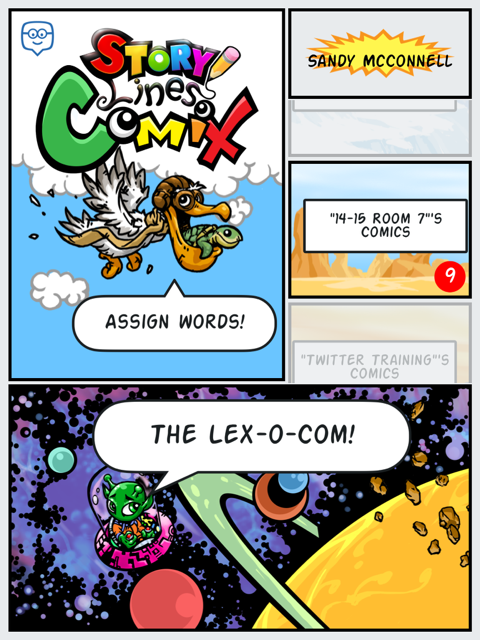
For the past couple of weeks my students and I have been playing around with Storylines Comix, another app by the responsive and creative developers at +Edmodo. Storylines Comix is an iPad only app available directly from iTunes. With this app students are able to collaborate to build and use an illustrated dictionary, the Lex-o-com.

Students have been actively engaged in discovering the meanings of words, including roots and derivations.  They also are exploring ways to tell the story of a word, using antonyms, synonyms and hyperbole.  They also are learning how not to define a word using the same word.

Beyond the vocabulary development, students are developing other 21st century skills including collaboration, critical thinking, communication, problem solving and teamwork.   Here is what we did:

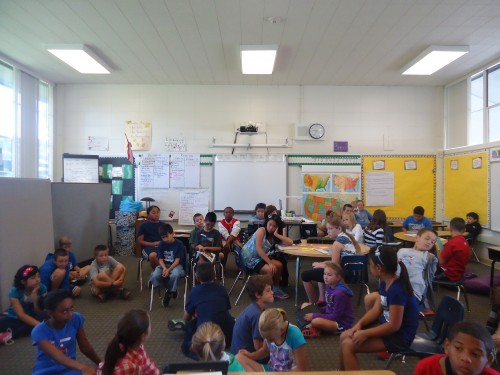
Initially, I paired up my fifth graders and allowed them to explore the Storylines Comix app.  I had thought I would start with my own list of words from our latest science unit, but decided to start with easier words.  I let them self select words and then decide with their partner how to use pictures to explain the meaning of the word. Students logged into the app using their Edmodo credentials and were able to see the words I assigned, as well as search the general word list (there are over 150,000 defined words pre-populated in the app)  The kids loved the filters that enabled them to add a variety of effects to their images.  They also really liked the stickers and have asked for more.  Honestly, their first attempts at defining the words were not so good.  For example. to define lazy, they used a picture of a student lying in the grass with the speech bubble, "I am so lazy."  However, this was a teachable moment and we had a great discussion about how best to, and not to, define words.  They realized that a lot more work went into making a dictionary than they originally thoughts.  Fortunately or unfortunately, due to some district firewall issues, it turned out that students could not save these first attempts.
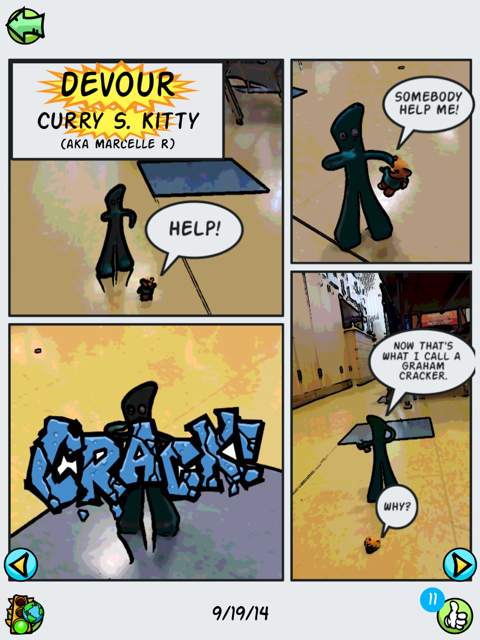
After consulting with the app developer, +Doug Banks and our IT department, the problem was resolved.  So I planned another day of word work. Students were allowed to bring small "character" toys from home to star in their comics.  We had everything from lego people to Gumby.  Students put more thought into how they would demonstrate their understanding of a word and which parts of speech were easier to 'illustrate'; I think they liked verbs best.

After students saved their Comix, they would see a yellow "stop light" which informs them their work is under review.  I can then go in and approve their comics for our class view only or to be added to the public Lex-o-com, giving them the ;green light'.  We talked about the criteria I would use to evaluate their work and when I did not approve comics, the dreaded 'red light', I was able to add a comment explaining why it was 'rejected'.  Students are then able to go in and make any adjustments to then resubmit their definition
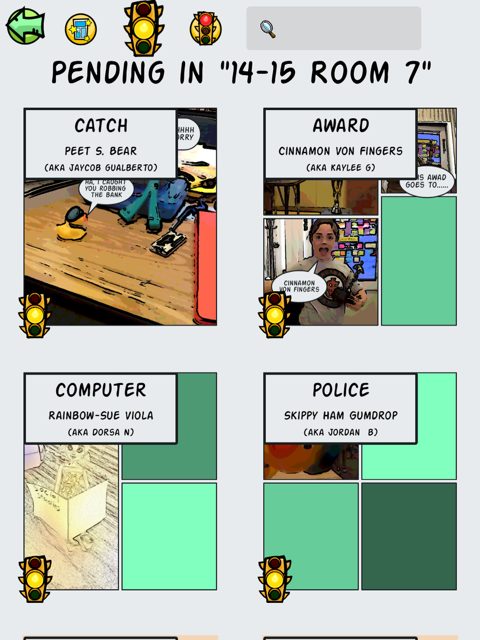
My most frequent comments were.  "I don't see how your cartoon demonstrates the meaning of the word" and, "Try not to use the word as part of the definition of that word." ,,, to the point that I found myself wishing for a drop down menu of recently used 'rejections' (I'd also like a less harsh word for the kiddos).  Nonetheless, when I showed them the comics I had rejected, they understood why and were more determined than ever to improve them. The motivation of having their work published was incredibly strong.

After definitions and comics were green-lighted, my students could go into our Room 7 dictionary to view just our approved work, and to the Lex-o-com to see which of our words I had approved for the whole world to see.  Students could give a thumbs up to "like" each others' comics and go home and share their work with their parents.

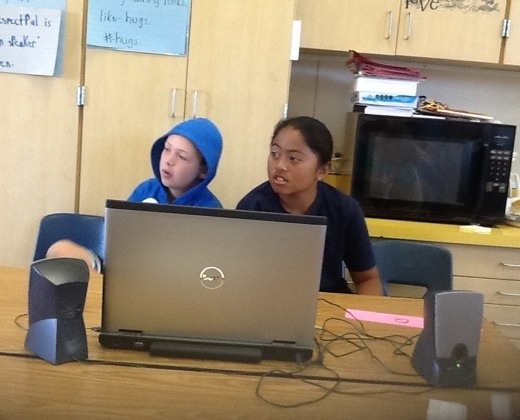
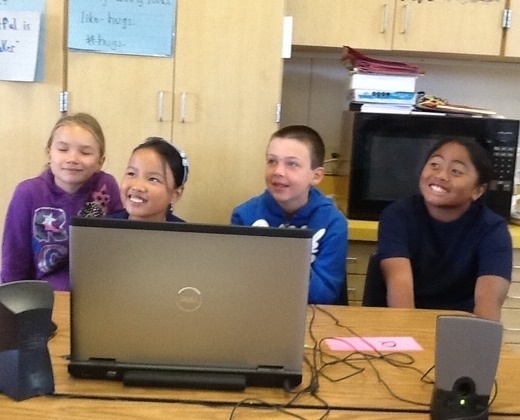
Friday my kids were super excited to have our classroom visited by Doug Banks.  He talked a little bit about the idea behind developing his app (to give students a creative way to express their knowledge) and how he came up with the funny pseudonyms the app assigns students to protect their identity. He then observed them as they worked on their comics, making suggestions and praising ideas as he went.  After each team had finished a comic, they sat down and gave feedback to Doug.  My kids felt so empowered that their voices were being heard!  Doug talked about what hard work it is coding and encouraged them to learn all they could about math and writing and art and teamwork! (No, I did NOT prep him to say that before hand.)  He left with some great firsthand feedback from real users and my kids were left with a sense of accomplishment and pride.  I don't think they ever realized they were learning!

Exit tickets from Friday.


Saturday, June 21, 2014

Bon Voyage to a Great Leader


I am taking time out from my usual #edchat to recognize the incredible contribution superintendent Dr. Debbie Blow has made to our district and to me personally. Dr. Blow is moving to a new district where she can be closer to her family. I will miss her inspiration, influence and energy.  For each of the three years since I was laid off from my tenured position in my previous district, I have been invited back to an open position. Once again this year I explained to them that until they could offer me the environment and opportunities that Cambrian has offered me, ....thanks but no thanks, I'm staying in Cambrian, even without tenure. Cambrian is that special of a place.

http://www.electricdatasystems.com/
As a "founding" member of the iPad academy, I am part of a team of 6 passionate and courageous teachers, all of us learning as we went along side by side with +Kirby Fell and Dr. Blow.  She showed extraordinary vision, leadership and enthusiasm as she gave us the tools we needed to proceed and then took her seat along side us while we flew the plane while building it.  As a great leader does, she trusted her team, and gave us the freedom to discover and develop best practices. We created a successful iPad Academy model that now includes 41 classroom teachers with 1:1 iPads. Our Home and School Clubs have purchased an additional 300 or so devices for teacher and classroom use.  For the upcoming 5th iPad academy cohort, there were 23 applications for an available 12 slots.

Having the iPads has truly revolutionized and reenergized my practice and my classroom. After 2.5 years I cannot imagine teaching without them now. Using this tool, our students are reading, writing, explaining their thinking in math and science, going on virtual field trips and even coding in meaningful, authentic and thus engaging ways.  Yes, they could have done much of it without the iPad, but the iPad is more captivating, genuine and helps prepare our students for their futures.  Our first cohort of "iPaddians" paved the way, researching, documenting and sharing best practices. We created a wiki to share what we've learned with our colleagues.  This was all under Dr. Blow's leadership.

+Tanya Prive writes in Forbes that there are top 10 qualities that make a good leader: 
  • Honesty
  • Ability to delegate
  • Communication
  • Sense of humor     
  • Confidence               
  • Commitment
  • Positive attitude    
  • Creativity               
  • Intuition 
  • The ability to inspire 

Having a background in executive management, I can tell you how critical Dr. Blow's leadership has been in the successful implementation of our 21st century strategies.  As our board moves forward with their selection of a new superintendent, I hope they will seek someone with at least some of her leadership qualities, so that we don't lose the momentum we have all worked so hard to gain. Developing global citizens with 21st century skills is one of the pillars of our strategic plan and it is my hope that the school board and new superintendent will continue support of our academies and professional development in Educational technology to help sustain this effort.

Dr. Debbie Blow possesses all of the Forbes 10 qualities and although she is one of a kind and amazing, the board would do well to find someone who can continue to provide the kind of leadership, vision and commitment that Dr. Blow seems to provide so effortlessly.  I hope they do not lose sight of her vision. She has been, and even in her decision to leave, continues to be, an inspiration to me.  

Dr. Blow, You will be missed.

Friday, October 11, 2013

Our First Mystery Skype - by Guest Blogger CaLa


written by student blogger, CaLa:

Our classroom had our first mystery skype with Mr. Salsich's class! If you're not sure what a "Mystery Skype" is, I'd be happy to tell you. A mystery skype is when two classes from a different place in the world, skype each other and ask yes or no questions to try and guess where the other class is. Our mystery skype was extremly noisy yet amazingly fun! 


Recorders documented the call.

Our class asked lots of great questions along with Mr. Salsich's class. It went pretty great and we new they were on the edge of finding out where we were. Soon after a really great question from them... they had guessed what state we were in! They were so happy! We asked away again.... We definetly got a lot closer to their state too. We got closer and closer and closer! Then, they got us! They found out we lived in San Jose!! Congrats fellow skypers! You were awesome! We absolutley loved skyping with you!

We all worked hard to figure out where they were. We each had a specific job and we learned a lot. We learned about geography, how to work together and how to solve problems. We learned that each job is important. Where in the world will we #mysteryskype next?
We used our iPads to look up information.

20131010-121213.jpg
Getting good questions and answers!


20131010-121419.jpg

They got us! We live in California. The were are questioners and answers... asking and answering questions from Mr. Salsich's class. But there is still more to go! More questions! :)
20131010-121709.jpg
Hmm... What's the answer to this one? :l


ScoSch was a supervisor, helping to keep us on track.


Wednesday, July 10, 2013

4 Essential Apps for 1:1 classroom

Today I attended  #AppyHour with Graphite and   +Common Sense Educators  A team from Graphite presented 4 essential apps for 1:1 classrooms.

 +Kelly Mendoza moderated two teachers:

  •  Lisa Butler- middle school teacher, PA, 6th social studies teacher, their school is 50% 1:1 and 50% BYOT 
  • Jennifer  – Pittsburg, PA Her hot tip? check out google vine

  1. +Animoto  Educator Pro paid version or a scaled down but completely functional free version for classroom use. I have used this for years and love it. It is easy to use for me and my students. Only problem I have is that with preview, you cannot hear the whole song or all of the lyrics. So I only let students use instrumental versions of songs OR I have to preview their product before they can watch it. Great idea from Lisa Bulter (@srtalisa) to use animoto for kids to produce tutorials on other tools (ex symbaloo)!
  2. Google Earth – be sure you have clear learning goals for students to follow in geography, math, science, writing and reading (google lit trips) 
  3. Google art – Amazing source for all things art. Can be used for story starters, use with art vista/docent program, view world wonders. You can take virtual field trips! Check out lesson plans and ideas under educator tab! 
  4. Schmoop – free paid, 0-12 grade  Tools and resources to help make learning fun. It can be used as homework help, to introduce topics or to support classroom teaching.

Sunday, March 17, 2013

The Bedley Bros' Research Communities


The past few days, some of us attended the CUE conference. 


This professional development was opportunity was wonderful and we wanted to share what we learned. So I'll be posting notes from the sessions I attended.

Using iPads to Build Research Communities in a Common Core Classroom

by the Bedley Bros - +Scott Bedley  and +Tim Bedley 
This standing room only CUE TIP was informative and engaging. It was a short presentation but packed with great ideas and examples. They talked about students can learn to research collaboratively. Tim discussed how students can delve deeper into a subject by using technology and their brains to mine reliable sources. Students were gives a topic to research and had to come up with consensus in their research community - (GLAD=>expert group)

Tim Bedley, is one of Riverside County's Teacher of the Year from 2013! He has some great info on his website about projects, his band links to some great classroom videos.  You can catch the Bedley Bros. #edchat which gives much of the information from the presentation. Tim also has an amazing band Rocking the Standards, check out their educational and entertaining songs. 

Their parting piece of advise, Leave your voice out! I am the last resource for feedback.

The session was time well spent, I just wish it had gone on longer!

Saturday, January 12, 2013

3 Classroom Apps for the New Year

Thanks HRM for the artwork!
This week I introduced my kids to three new apps which I am hoping will provide me with additional assessment information. We started a class blog using kidblog.  It is a secure blogging platform that my kids can use to create their own blog page within our group.  So far we wrote about our winter break and we've started with doing our weekly reading log online.  I am learning more about my students' writing and they are learning from each other.  There is an app for easy access to the blog from our class iPads. I am hoping that blogging will provide an opportunity for communication, collaboration and developing authentic writing skills.  My kids know that I blog, too. It helps them to see that writing is a life-ling skill.
We also started playing around with Khan Academy. Although I did the set up on my Mac, the kids and I are now using the app.  I know Khan has its detractors, and I am remaining open minded as I pilot its usefulness in my classroom.  I teach a 4+5 combo with very independent learners and I am hoping that Khan Academy will allow my students the ability to go deeper into subjects in which they have a need and or interest.


As part of our monthly life-skill focus of kindness, my students have begun a Kindness Project. We brainstormed a variety of ways that we see or hear kindness.  We are now working on developing icons or memes to represent kindness.  One of the tools we are using to draw them is the third app we started using: Skitch, which is part of Evernote.  Some students are also working on short movies to inspire kindness. We were inspired by this video from +Dan Pink 's daughter, Sophia.

Friday, January 4, 2013

#EdTech Reflections from 2012


It's the beginning of a new year, a time for looking back and a time for crystal ball gazing. On twitter +Vicki Davis,  suggested: Write a 2012 year in review about what you've done, where you've been, and the joys of the year. Take time to remember. In honor of 2012, I reflected on on my top 12 highlights from the year. As I am continually trying for life/work balance, some of the highlights are related to my teaching practice, and some are purely personal. All 12 can be found on my life+teaching blog, but since five of them are related in some way to our iPad Academy adventures, I am sharing them here, too.


1. iPads in the classroom: In March, I applied to and was accepted into the iPad Action Research Academy  in our school district. We received our class set of iPads in April and my students have been engaged ever since. I started a blog to keep track of our experiences and have had the opportunity to work with an amazing team of innovators as we have pioneered use of this technology in our district. As a group we have used a wiki and primarily Edmodo to communicate, problem solve and collaborate. It really has been a game changer for me, my students and my colleagues.

5. Since I have started teaching, I have been lucky to work with some amazing educators whose focus is special needs kids: Bill Theimann, Linda Bruton, Julie Paolini and a supportive staff and administration.  I had just assumed that their approach of compassion, inclusion and treating all students as learners was the norm.  When I left SUSD I found that was not the case. However, I was brilliantly lucky to be placed in a room next door to the new SDC teacher, Sheila Monger. Monger, an inclusion specialist, shares my views and passion for creating a seamless education environment where all students learning needs are met.  This school year, I am teaching a 4+5 combo and Monger is teaching 2+3+4+5. Having more of an overlap has opened the doors for more integration and inclusion.  Together, we are gradually breaking down barriers and opening doors for opportunity for teachers, administration and students look at learning a new way.http://mrsmcconnellsblog.blogspot.com/2012/05/technology-and-inclusive-education.html 


8.  Education + Technology = #EdTech: When I decided to become a teacher, my vision was to use what I had learned "in the real world" to help me be a better teacher.  I have worked hard, and spent a lot of my own time and money, to find meaningful ways to bring technology into the classroom to provide my students with authentic learning experiences.  When I had to leave SUSD, I was afraid I'd have to start from zero to re-establish myself as a technology leader with my new district. At my age, (really at any age) starting from zero seems like a grand waste of time.  One of my favorite expressions is that I'd rather ask for forgiveness than ask for permission.  As a manager, I respected the initiative that showed. As a teacher I appreciate the perceived independence, even though I know it can sometimes frustrate my principals.  So, I just did what I do and kept my principal informed.  Through programs like CreaTV and the iPad Academy, I have been able to flex my tech muscles while providing our students with unique learning opportunities. I have also been in a position to help develop other teachers as they learn how to use technology to become more efficient and effective educators. In January, +sheila monger  and I were honored with a Good Apple Award by our school board and recognized for our contribution in the area of educational technology.  I am very proud of the work we have done to help teachers and students use technology in meaningful ways.

10.  In October of this year I applied to and was accepted into another academy at our district. Cambrian and others use the academy model as a choice method for professional development (see page 32).  This time it is the Digital Media Academy.  I saw this as a great opportunity to merge my work with CreaTV and classroom learning using digital media.  Our students have started out by producing short PSAs  addressing personal concerns such as playground safety, littering, and bullying.  We have been able to use student created content on our monthly television show on CreaTV, Comcast channel 28,  Around Bagby.  Our students are becoming better planners, writers, problem solvers, communicators and collaborators.

12. Assessment. As I started this year end review with iPads, I'm ending with them.  While initially I used the iPads for student engagement and learning, I also used student work on the iPads for informal assessment.  However, I wanted to learn more (and still do) about ways I can use the devices to effectively assess student learning.  In August, with the help of +Jill Florant  at Edmodo, I started using Edmodo not only to communicate with my parents and students but also to assess their learning. I started using assessments and quizzes. Parents are able to see their child's progress and it really has improved the home-school connection.  In addition to Edmodo, I also started using Class Dojo for behavior management.  The kids love their avatars and work hard for positive behavior reports.  This fall I used adopt-a-classroom to generate crowd-funding for SpellingCity and our collaborative weather project.  SpellingCity helps administer spelling practice activities and tests, grades the tests and provides useful reports to me and the parents.  In 2013 I plan to further investigate and utilize methods for assessing student learning and engagement on iPads.

Happy New Year!

Sunday, December 23, 2012

Exploring Solids with Think 3D Free

We have been learning about solids in my 4+5 combo math class. I use manipulative blocks, but since I don't have Legos, they tend to fall over, end up on the floor, etc. the high-touch blocks are great for some, but when it comes to manipulating the solids, there are challenges.

Enter a high-tech counterpart, Think 3d Free. The kids can create unlimited possibilities of shapes and explore and interact with them. They are sharing shapes and challenging each other to identify properties of their creations. It has really helped them understand perspective as well as volume vs. surface area. And, it's fun! I gave my kids free time on the iPads right before break and they asked, "can we use 3D Free?" Yes, you can!


- Posted using BlogPress from my iPad

To share or not to share

There has been some discussion within our academy, staff and union about sharing our iPad carts amongst multiple classrooms. As discussed here before, teachers in our district were invited to apply for the pilot 1:1 program. Along with the cart of iPads came requirements to help research and recommend policy and procedures for future implementations in our district. For a variety of reasons, some teachers chose not to apply. Those that did apply and were accepted into the program have been an amazing group of pioneers who I am privileged to work with!

Apple designed the iPad for individual use. After all, it is called an iPad not a wePad or usPad. There is no file management system on the iPad. As we in the academy have found out, getting user content off of the iPad is not a straightforward proposition. Each app has its own peculiarities of where and how you can offload or download. It takes a spreadsheet to list and track the logins and work-flow process you need for each app. When we start to think about sharing and adding the layer of multiple logins, the problem grows even more unwieldy.
Some of our cohort are sharing the devices in a variety of creative ways. During her class' music, PE and other out of classroom times, one teacher loans her cart to a special ed class to use a variety of educational game apps. The middle school cohort obviously shares devices across their class periods. She started out using Apple Configurator which has been a less than positive experience. There have been challenges, but she works diligently to train all of her periods to be respectful of each other's work and they continue to work through their challenges. Last year at Bagby, we hosted a sibling lunch where our students invited their school age siblings to come and use the iPads. One group of girls made a 'horror film' in iMovie titled "the Attack of the Second Grade Sisters." I have used the iPads in my Excel/RTI class to expose a greater number of students at our school to the technology. Last year I had 2 4th graders from a combo class join me for Science and they used the devices alongside my home room students.
I have discovered that without the extensive digital citizenship and cyber-safety education from Common Sense Media that my home room participated in, my "visiting students" do not always follow iPad and basic digital citizenship rules. And since I only have my RTI students for 4 hours of reading a week, I simply do not have the time to deliver digital education to them. Further, despite reminders, they do not log off of their accounts when they leave, they walk with the iPads open, they use apps when they are not supposed to and they look at work that other students have created, just like they would look into another student's desk. They do not feel ownership for the devices and do not treat them with respect. My home room students feel that their privacy is being violated and that their work is not being respected.
One of the benefits of having the cart in my room is he immediacy of access. When the shuttle flew over, we could go outside with our iPads, take pictures and interview observers. Students create work over days or weeks. if they are sharing devices, they run the risk of other students deleting or altering their work. Yes, we can have rules in place. And we do. However, adding users adds the potential for confusion and error. One possible help would be apps such as the Our Pad. Kelly Walsh wrote is his blog, Emerging EdTech about such apps. "The basic idea behind Our Pad, HotSwap and the like is that it stores user names and passwords for a couple dozen pre-configured web apps for multiple users. Each user sets a profile used to sign in to the app. When you are signed in as the current user on that iPad, your configured apps are available through a menu." However, these apps are really designed for consumers and not students.
Mark Gleeson, a respected iPad blogger, writes "The most obvious problem with sharing iPads..., is the lack of file system and autosave/store within app functionality of the iPad. It’s great for its original purpose of easy access for the intended individual use scenario. For shared environments, it creates a mountain of files stored by potentially hundreds of users. Will other users delete/ overwrite or edit the file? Will we run out of storage space because of the number of photos, movies, animations, comic strips, documents, drawings, ebooks etc floating around all those apps waiting to be completed?
Again, some of this can be dealt with through a number of file sharing or transferring methods... The biggest issue is consistent adoption of these methods." The "workable solution" requires training of students and staff, not only in the process of file transferring but in the consistent practice of it. And in this case, whose responsibility is it to do the training? Who is ultimately responsible for the cart? The iPad? The user content? Gleeson has implemented overnight sharing for teachers to explore the possibilities of iPads on their own time. The iPads need to be back in the hands of students the next day and he has had to implement a detailed set of procedures to make this work.
Edudemic posted an article, 5 Critical Mistakes and they cite as number 4: 4) Treating iPads like multi-user devices:
iPads were designed as a single-user device and not meant to be shared via carts. Financial constraints have forced many schools to abandon 1:1 aspirations, but sharing them separates the functionality from the user. Carts that rotate through several classrooms force teachers to take time away from learning, create a nightmare of student accounts, and often focus attention on workflow systems rather than learning."
"Instead of sharing iPads across multiple classrooms, schools should be allocating them to a few select pilot classrooms for an entire year. Schools should be documenting pilot group successes and failures and begin to codify iPad integration functionality and elicit best practices to serve as a foundation for future iPad expansion. If a school cannot envision financially moving to a 1-1 iPad model, then Bring your Own Device (BYOD) models may prove much more compelling than shared iPad systems.

An important thing to understand is that this is really only providing access to web based accounts. It does not allow for multiple users on apps. So tracking individual performance data across multiple users on a single app does not generally seem to be possible or at least not easy. Ideally, teachers will be using iPad created work as performance assessments of their students' work. If multiple students are using the same device, we run the risk of accidental or intentional overwriting, deleting, or changing of user data and student work. We wouldn't have two students take a test on the same piece of paper would we?
It seems to me that while sharing may be the only option for some schools, it is not ideal. So, what about a one or five iPad classroom? With a smaller set of iPads, more classrooms could have some iPads. Over time, and once iPads have proven their worth, Home & School Club money could more likely fund 5 iPads per target class than 30. An iPad "suitcase", rather than a cart could utilize one iTunes account that shares apps across 5 devices, which stays within Apple's license sharing rules. And since we are teaching digital citizenship, as educators we should model it and pay for all the software we use. 1-5 iPads could be used in centers, for project based work, for differentiation and reward. Teachers could use one iPad as a productivity tool with apps such as Class Dojo, PowerSchool and Classroom Organizer.Heidi Butkus offers a variety of suggestions for a small set of iPads.
This is still relatively new technology and its significant impact has yet to be measured or quantified meaningfully. As more districts try various implementation methods, we'll have a better point from which to base decisions. Our iPad Action Research Academy recently added a second cohort and we broadened our scope to include two other districts. Our colleagues in Moreland and Union are testing a grade level cart share system and their experiences will provide useful insight? It appears that Apple has plans to release an iPad (or iOS) which supports multiple users, according to Apple Insider which potentially could help address some of the problems with sharing. In the meantime, our cart is staying in our room. It's not that I am greedy. I just worked hard to get these tools in the hands of my kids, and I worked hard to get my kids to be responsible digital citizens. I want to be able to study and quantify the true benefits of a 1:1 environment. I'm happy to work with my colleagues to help them identify ways to acquire and use one or five or thirty devices in their own classrooms.
- Posted using BlogPress from my iPad

Saturday, December 15, 2012

Student PSAs with iMovie

Over the past few weeks our students have been researching, writing, filming and editing Public Service Announcements (PSA) about issues that concern them. Our principal wrote about students using this platform to address positive behavior. One of my students suffered a concussion during some early morning playground horseplay. He learned about the seriousness of brain injuries and wanted others to know about the risks so he made this movie, Playground Safety. Some students used their iPads and some used our small Sony cameras. All of them used iMovie to edit and produce their projects.


I am constantly amazed by my students creativity, initiative and productivity using 21st century tools!


- Posted using BlogPress from my iPad

Wednesday, December 12, 2012

Substitute teachers and iPads.

A few weeks ago, I met my substitute teacher for the day at my door. I was on site for meetings, but would not be in my classroom. In my plans and in our chat, I told her about how my kids would be using the iPads to work on two different projects that were in progress. She said, "oh we won't be needing those, I have other things planned."

Later that day I saw her and she seemed pleasantly surprised by my students ability to use the devices to meet their learning goals. It seems that despite her 'other plans', my kids knew what they needed to do and use to finish their assignments.

This week I'm out for a whole week for professional development. I have never, ever been away from my class this long and was quite worried about it. I made sure I had a sub who was comfortable with technology. She has been amazed by what the kids can and do accomplish.

It got me thinking about the first sub's initial reluctance to use the devices. I thought it was a generational thing. Although I am over 50, I've found most teachers my age are less likely to be flexible and adaptable to including technologies into their practices. I am an anomaly due to my first career in high tech. ( I really did work for a company that helped invent the Internet.) I realized it wasn't that my first sub was afraid to use the tablets.
It was more that she thought of iPads as a toy, something a sub might use to fill time, like a game of 7-up or a seasonal crossword puzzle. She hadn't thought of them in regards to their educational value. My kids use their iPads to create, collaborate, problem solve, communicate, research, and yes, to play games. But when they play games, it is with a purpose.

Their new favorite game site is SumDog. Sumdog's learning engine adapts its questions to each student's ability helping teachers deliver Common Core State Standards. It is a group of math games that help students learn and practice math concepts. To use the site with ipads, they need ro go through Rover since it has flash animation. I can target the kids activities to concepts we are working on in class. I am also able to gather data on their activities to see which concepts they are struggling with and where they have mastered concepts. they collaborate with each other and strategize how to play the games. They can play against and with each other. Last week we won a city wide contest! I actually had to tell my kids, "stop doing math and go outside to play!"

So yes, they do play games on the iPads, but there is always a learning objective at the heart of the activity.
- Posted using BlogPress from my iPad

Saturday, December 8, 2012

Show What You know

This week, Katrina Schwartz wrote a great blog piece on the uses of Educreations, and other interactive whiteboard type apps,  in the classroom. She notes that Replay Note, ScreenChomp, ShowMe, DoodleCast Pro, Knowmia, Explain Everything and Educreations all offer teachers the ability to record the visual and audio components of a “whiteboard” lesson on their iPads, and share it online. Schwartz is with KQED's MindShift which itself is a great resource for discussions about education trends, but I digress.


Although we have been using Educreations, Explain Everything, ShowMe and ScreenChomp fairly interchangeably over the past year since we got our 1:1 iPads, Educreations really is our "go to" app for this purpose.  In my classroom, students use these tools as a way to demonstrate their learning.  It really has helped them solidify their problem solving process, clarify their thinking and be able to articulate it using academic vocabulary. Last year I had a student who really struggled with math concepts. One day he had an ah-ha moment and declared that he must make a recording to share his discovery of how to solve double digit multiplication with the world!

What I would like to see is an easier way for students to share their work outside of the classroom without having their own account.  Our biggest challenge with almost every app has been the the lack of consistency of process in saving student work, getting it to a place where I can see and assess it and being able to show it to parents.  

So far, all of our used for these apps have been student based.  Students use the apps to share learnings in math, and Science and to develop literacy. Students love being able to use Educreations and other tools to demonstrate their knowledge and share it with their peers.  They are motivated to do their best work on an authentic and meaningful way.

Friday, November 9, 2012

Weather Kids

Weather Whenever, Wherever! I am so energized to be collaborating with two colleagues at two other schools in our district on a new project: Weather Kids. The three of us (Debbie, Camille and I) met last night to create a weather project for our students. We were inspired by a team that Debbie met at Napa Cue teachers Stacy Holder and Julie Berglin. I'm teaching 5th grade science but both my 4th and 5th graders will participate in the project. Debbie teaches a 3-5 SDC combo and Camille, a K-1 combo. Our students will be collecting data on rain fall, temperature and wind speed using a variety of high touch instruments. They will then record and share the weather data using our iPads via a Google form and Edmodo. Weather is a part of the science curriculum in both first grade and fifth grade so it fits all three of our curricula.

Stacy and Julie were warmly willing to share their templates and experiences with us to make roll out for us much easier.

We are also hoping to use either Scribble Press or PaperPort to create science journals that the students can share with one another. But we are still trying to figure that piece out. Everyone in our academy is finding sharing from one device to another to be challenging. We are also hoping to Skype between schools to build some community.

Eventually we'd like to add more tools such as barometers and hand made anemometers. I was thrilled to receive generous funding from friends and families through adopt-a-classroom. We'll be incorporating math with calculations to find dew point, converting between metric and US customary measurements (inches) as well as graphing and creating charts to help understand and analyze data. We will also be writing (we've already started with weather themed parts of speech) and geography as results start to come in from schools we partner with throughout the country and the world!


I just found out from UPS that my equipment was delivered while I was in our meeting so I'm super excited to get started! With the ferocity of Superstorm Sandy, my kids are well aware of weather and have a lot of interest in this project as well! Of course, they think it was named after me;)

- Posted using BlogPress from my iPad

Sunday, October 28, 2012

Classroom Management, PD and How do we use these things to help kids learn?!

A few weeks ago, I bookmarked an interesting article in edudemic called 5 Critical Mistakes Schools Make With iPads (And How To Correct Them). To summarize, the five were (1) focusing on content only (and not being able to see that you could use showme in Math, for instance), (2) lack of teacher prep in classroom management, (3) expecting the iPad to be like a laptop, (4) treating iPads like a multi-user device and (5) failure to communicate a compelling answer to "why iPads?"

I will come back to 4 and 5 in future posts, but for now I want to focus on number two, lack of teacher preparation in classroom management of iPads.

I think we sometimes assume that because the Apple user interface is generally so smooth and intuitive that it should be simple to integrate the devices into our classroom practice. In our school district, we have adopted a pilot/academy model (discussed in previous posts and to the point of number 4 above). One of the outputs of our academy members is to document best practices in the classroom, so that as more teachers adopt this technology, they won't be starting at zero like we did. We started a wiki to help ourselves and other teachers not only by making app suggestions but by addressing issues such as synching our iPads with the cart, to use or not use Apple Configurator, classroom iPad rules and even how to velcro iPads to the cases!

However, the issue raised in the 5 Mistakes article is not so much the practical management of iPads, which we are addressing, but also the more pedagogical issue of how to incorporate these devices into the learning process.
Decades of research has shown that when teachers have access to new technologies, their instinct is to use new technologies to extend existing practices. 
Without guidance, iPads become expensive notebooks used by students in very traditionally structured stand-and-deliver classrooms. Teachers need time for professional collaboration (and often external support) to learn to nurture reading, writing, speaking, and listening skills and to develop strategies to differentiate instruction using a range of apps and tablet-friendly Web tools.

Clearly, we have more work to do!

Saturday, June 2, 2012

Tablets And Assessments

Interesting article about assessments and tablets. There are valid concerns but given the direction technology is going, and the speed, these concerns will have to be addressed by test companies and tablet designers.

Brian Bleil writes, in Pearson's

href="http://fwd.pearson.com/">FWD blog, Tablets and Assessments - A Closer Look. He briefly discusses the obvious benefits of tablets then spends the bulk of the post on cautions about the drawbacks or limitations in regards to statewide testing. Pearson is an assessment provider so they have a vested interest.


- Posted using BlogPress from my iPad

Monday, May 28, 2012

iPads and Reading

As a late baby boomer, When I first got my gen one iPad, I wasn't sure I was ready to read on the thing. I have always been an avid reader and I love the feel, smell and heft on a good book. I have learned to appreciate the portability of books on my iPad, no more carrying a stack of books in my luggage or purse. I also love the fact that I can look up words. I grew up with parents saying, " go look it up" and I tell my students the same thing. But personally I am super lazy about doing that. Until now. I just touch the word and I get a definition! Love it!


So once I got 1:1 iPads for my students, I have been finding all sorts of apps for math, science, history and grammar, but not a lot for reading comprehension. I've been thinking a lot about how to use this tool in my reading class. Enter, iPad Literature Circles. This site is devoted to providing suggestions for a variety of (mostly free) apps to promote student ownership of learning using this incredibly diverse tool.
Conducting Literature Circle with mobile devices such as the iPad, not only provides immediate access to a diverse selection of books, but also to reference materials, research tools, interactive maps, and a slew of creation and dynamic notebook apps. Within this single device, students can quickly check the meaning of a word, run a quick background check on a historic event, or articulate their understanding of text with a range of multimedia apps. Teachers can now easily differentiate the processes students can use to demonstrate understanding.

Just found this, Mr. Gleeson talks in his blog about using Edmodo with lit circles!

Technology can play a big part in this and can also be used to enhance, simply and streamline the whole process. This is where the iPad comes in. ( I’ve been neglecting the star of Mr G Online for a while as I’ve been reflecting on education overall). With its ability to act as the actual book ( or text in general), its connectivity and collaborative capabilities and the tools and apps that it can add to the mix, the iPad can be the all-in-one Literature Circle Experience. Using Technology as the tool for creating the preparation for the discussion means there are opportunities for the teacher to check in on the potential online discussions that may occur and have access to the prep work the students have done for the discussion.

I have my summer project!

- Posted using BlogPress from my iPad

Thursday, May 24, 2012

Didn't see that coming

Even before we got our iPads, we came up with class rules and consequences.  As usual, the kids were very thorough and we thought we had covered every "what if". We have added a few along the way:

  • Don't leave the iPad on the floor unattended (responisble)
  • Don't set the iPad on wet grass (safe)
  • Ask before touching another person's iPad, even if you are helping them
At the end of every day, my CTO plugs the iPads back into the "COWPad" (computer on wheels for iPad).  They have gotten so good at it that I rarely check.  This morning when I opened the cart, I noticed a student's iPad was missing. Sometimes I hold them out for a reason, but was pretty sure I had not held out Jane's (name changed to protect the guilty).  I looked in my usual hiding places and didn't find it. I looked in her desk (since she was absent) and couldn't find it. I had all of the students look in their desks and we couldn't find it. I even checked the COWPad next door, we couldn't find it! Now I am slightly panicking. So I sent her parents an email, asking them to ask Jane where it might be.  this is the response I got back:

She had it yesterday and was using it to do her homework. When she wasn’t feeling well this morning I left it with the office and asked them to return it to your class. 

I was shocked! No one has ever taken, much less asked, to take the iPads home.  They know they can't.  She knows better.  Now I am struggling with an appropriate consequence. The student was not malicious, she was using it to catch up on missed work. But she certainly knew that she should ask before taking it home.  

I guess we need a new rule - The iPad stays in the room! Do not take it out of the room without asking permission.


Tuesday, May 15, 2012

Wake up all the teachers, time to teach a new way!

I was driving to work the other day and thinking about a current discussion in my district about whether to improve our use of technology in schools. Some teachers think that the investment in technology is made on the backs of teachers. Some teachers see technology as one tool that teachers can us to improve their practice. Some of us feel that the integration of technology into our practice is mandatory as we educate 21st century citizens. I heard this song, sung by Harold Melvin and the Blue Notes and just said...yeahhhhhh!

Complete lyrics: http://www.directlyrics.com/john-legend-wake-up-everybody-lyrics.html
Wake up everybody
No more sleepin' in bed
No more backward thinkin'
Time for thinkin' ahead
The world has changed
So very much
From what it used to be
There is so much hatred
War and poverty, whoa, oh
Wake up, all the teachers
Time to teach a new way
Maybe then they'll listen
To what'cha have to say
'Cause they're the ones who's coming up
And the world is in their hands
When you teach the children
Teach 'em the very best you can
The world won't get no better
If we just let it be, na, na, na
The world won't get no better
We gotta change it, yeah
Just you and me...
- Posted using BlogPress from my iPad

Friday, May 4, 2012

Sharing Stories


Our kids collaborating to tell their stories and use Show Me to teach each other.

Tuesday, April 24, 2012