Showing posts with label apps. Show all posts

Saturday, September 20, 2014

Growing Academic Vocabulary with Storylines Comix

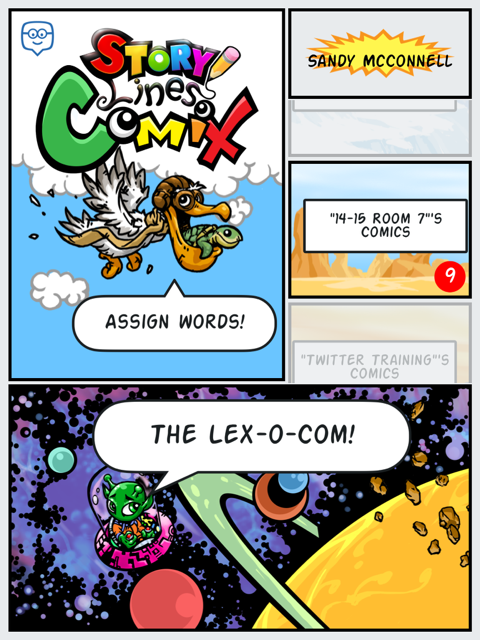
For the past couple of weeks my students and I have been playing around with Storylines Comix, another app by the responsive and creative developers at +Edmodo. Storylines Comix is an iPad only app available directly from iTunes. With this app students are able to collaborate to build and use an illustrated dictionary, the Lex-o-com.

Students have been actively engaged in discovering the meanings of words, including roots and derivations.  They also are exploring ways to tell the story of a word, using antonyms, synonyms and hyperbole.  They also are learning how not to define a word using the same word.

Beyond the vocabulary development, students are developing other 21st century skills including collaboration, critical thinking, communication, problem solving and teamwork.   Here is what we did:

Initially, I paired up my fifth graders and allowed them to explore the Storylines Comix app.  I had thought I would start with my own list of words from our latest science unit, but decided to start with easier words.  I let them self select words and then decide with their partner how to use pictures to explain the meaning of the word. Students logged into the app using their Edmodo credentials and were able to see the words I assigned, as well as search the general word list (there are over 150,000 defined words pre-populated in the app)  The kids loved the filters that enabled them to add a variety of effects to their images.  They also really liked the stickers and have asked for more.  Honestly, their first attempts at defining the words were not so good.  For example. to define lazy, they used a picture of a student lying in the grass with the speech bubble, "I am so lazy."  However, this was a teachable moment and we had a great discussion about how best to, and not to, define words.  They realized that a lot more work went into making a dictionary than they originally thoughts.  Fortunately or unfortunately, due to some district firewall issues, it turned out that students could not save these first attempts.
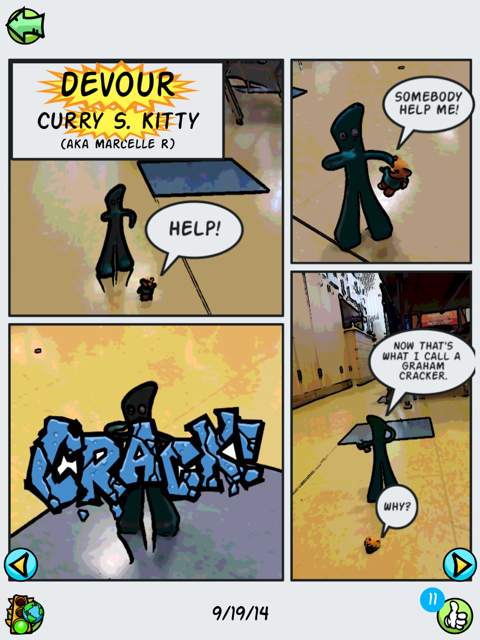
After consulting with the app developer, +Doug Banks and our IT department, the problem was resolved.  So I planned another day of word work. Students were allowed to bring small "character" toys from home to star in their comics.  We had everything from lego people to Gumby.  Students put more thought into how they would demonstrate their understanding of a word and which parts of speech were easier to 'illustrate'; I think they liked verbs best.

After students saved their Comix, they would see a yellow "stop light" which informs them their work is under review.  I can then go in and approve their comics for our class view only or to be added to the public Lex-o-com, giving them the ;green light'.  We talked about the criteria I would use to evaluate their work and when I did not approve comics, the dreaded 'red light', I was able to add a comment explaining why it was 'rejected'.  Students are then able to go in and make any adjustments to then resubmit their definition
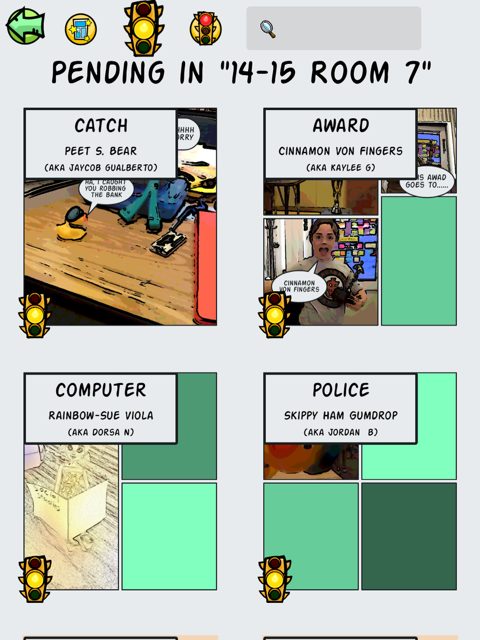
My most frequent comments were.  "I don't see how your cartoon demonstrates the meaning of the word" and, "Try not to use the word as part of the definition of that word." ,,, to the point that I found myself wishing for a drop down menu of recently used 'rejections' (I'd also like a less harsh word for the kiddos).  Nonetheless, when I showed them the comics I had rejected, they understood why and were more determined than ever to improve them. The motivation of having their work published was incredibly strong.

After definitions and comics were green-lighted, my students could go into our Room 7 dictionary to view just our approved work, and to the Lex-o-com to see which of our words I had approved for the whole world to see.  Students could give a thumbs up to "like" each others' comics and go home and share their work with their parents.

Friday my kids were super excited to have our classroom visited by Doug Banks.  He talked a little bit about the idea behind developing his app (to give students a creative way to express their knowledge) and how he came up with the funny pseudonyms the app assigns students to protect their identity. He then observed them as they worked on their comics, making suggestions and praising ideas as he went.  After each team had finished a comic, they sat down and gave feedback to Doug.  My kids felt so empowered that their voices were being heard!  Doug talked about what hard work it is coding and encouraged them to learn all they could about math and writing and art and teamwork! (No, I did NOT prep him to say that before hand.)  He left with some great firsthand feedback from real users and my kids were left with a sense of accomplishment and pride.  I don't think they ever realized they were learning!

Exit tickets from Friday.


Sunday, August 3, 2014

Using Edmodo with Younger Students: part 4 - App-a-looza

Using Edmodo with 4th and 5th graders has opened my mind to a variety of creative possibilities. After attending my second #edmodocon in person at +Edmodo headquarters, I  was challenged to begin using apps.  Having 1:1 iPads in my classroom made this endeavor easier, but there is a lot you can do with 5-10 devices, whether mobile, laptops or desktops.  Due to an incredibly difficult year, I was not as successful as I would have liked in trying new apps, but at least I dipped my toe in and am looking to dive in next month when I get my new class. Trying a variety of apps became easier when in the fall of 2013 I won the Power of One contest and was awarded a substantial amount of Edmodo app store credit to share throughout my district. At this point I was blessed with an overabundance of apps and set my students on a quest to explore and review new apps.Here are some highlights.

Some apps were great for students who had finished their work early and could work independently. My students liked Manga High's PEMDAS for math. They also liked Animal Cell, Thirteen Colonies and Slim the Ogre apps for ELA.  With a nod to gamification, they really liked when they were awarded badges automatically.  I used +Common Sense Educators Digital Passport app as a refresher whenever a student violated our classroom agreements.

Demonstrating understanding and Storytelling with Cartoons

My  students loved using +PowToon , +go animate and +Pixton Comics  We used these somewhat interchangeably, and students decided which tool they wanted to use to suit their purpose.  With GoAnimate, they realized they needed to so a lot more planning than they'd anticipated.  They realized the benefit of storyboarding, for which they used Storyboard That,  as well as editing their work.


Learnstreet - Hour of Code

Last winter we participated in the CSEDWeek/Code.org Hour of Code. We used the LearnStreet app which had a special 'course' where students could code their own holiday card.


StoryLines Pages

Inspired by the story All Good Things by Sister Helen Mrosla, StoryLines Pages asks each student to express (in one sentence) something unique that he appreciates about his classmate. In my blogpost about this project I explained how this project worked well for all abilities, and helped me identify some grammar, spelling and punctuation trends in my students.  I think this app would work well with much younger students as well.


Snapshot
I started using Snapshot after I returned to the classroom in late April.  Snapshot is a Edmodo app that helps you see  what your students know (and what they don’t). With real-time feedback and multiple ways to view results by student and standard, Snapshot helps you take the guessing out of assessing common core standards.  It was really helpful for me to get a handle on what they had learned while I was gone. I also used it to help double check meeting of standards for our report card.  This coming year I am looking forward to using Snapshot for pre- and post assessments, both on a lesson-by-lesson basis (exit tickets, etc) but also for broader concepts.

Apps I want to try

There are many apps in the Edmodo app store that I want to dive deeper into including Educlipper and instaGrok.  I also plan to use Curriculet and Subtext for reading comprehension and literature circles.

Using Edmodo with younger students has proven invaluable in helping me manage my time, increasing student engagement and providing my students with real and authentic ways to become good digital citizens.  We've participated in groups with classrooms across the country and we have an alumni group to keep connected with our past students. Edmodo is a game changer! And I feel like I have barely scratched the surface!

Wednesday, July 10, 2013

4 Essential Apps for 1:1 classroom

Today I attended  #AppyHour with Graphite and   +Common Sense Educators  A team from Graphite presented 4 essential apps for 1:1 classrooms.

 +Kelly Mendoza moderated two teachers:

  •  Lisa Butler- middle school teacher, PA, 6th social studies teacher, their school is 50% 1:1 and 50% BYOT 
  • Jennifer  – Pittsburg, PA Her hot tip? check out google vine

  1. +Animoto  Educator Pro paid version or a scaled down but completely functional free version for classroom use. I have used this for years and love it. It is easy to use for me and my students. Only problem I have is that with preview, you cannot hear the whole song or all of the lyrics. So I only let students use instrumental versions of songs OR I have to preview their product before they can watch it. Great idea from Lisa Bulter (@srtalisa) to use animoto for kids to produce tutorials on other tools (ex symbaloo)!
  2. Google Earth – be sure you have clear learning goals for students to follow in geography, math, science, writing and reading (google lit trips) 
  3. Google art – Amazing source for all things art. Can be used for story starters, use with art vista/docent program, view world wonders. You can take virtual field trips! Check out lesson plans and ideas under educator tab! 
  4. Schmoop – free paid, 0-12 grade  Tools and resources to help make learning fun. It can be used as homework help, to introduce topics or to support classroom teaching.

Monday, September 17, 2012

Learning from ourselves

Debbie R. Has a great idea to keep a daily log of activities she tries with the iPad. I am going to try this!

Today my students used the iPads to take AR quizzes and look up words in the dictionary.

Monday, May 28, 2012

Teacher Doc Management with and for the iPad

We have been talking, within the Academy, about creating, sharing and vetting lesson plans and other documents.  There are a number of sites and blogs out there, but we are thinking about how to condense, contain and organize the vast amounts of content out there. 
Escondido has a Google spreadsheet. Since it is in a spreadsheet, you could sort by subject, grade level or price (they are only reviewing free apps going forward).


Today I was thinking about some sort of tabbed web site with a tab for each month of the school year (I am trying to do some forward planning!).  But then again you could have other sorts... here are just a few I thought of:

  • Grade level
  • Content area
  • Month by month
Then you have types of docs:
  • teacher productivity apps
  • student apps
    • productivity
    • learning games
    • production
    • portfolio
  • processes and procedures
  • lesson plans
  • student work
    • samples
    • actual final product
If my 5th grade math serves me, that is 33 different combinations.  A clean looking blog is Apps in Education.

Lisa Johnson, who has the blog TechChef4u  offers some guidance and templates for iPad lesson plans. She sums up her process nicely and even has this graphic (created with an app) to go along with her ideas. She also pins a lot of ideas to Pinterest, which frankly gave me the idea that all of this information needs somehow categorized.

Cave Creek Unified in Phoenix created a website for teachers to celebrate learnings with their iPods. I love the idea of a site but like this one, I am afraid it would just be a list.  

Another review site is iear.org  . They also include student reviews which is a great idea.

Lessonopoly, a lesson planning resource from SVEF  has only 14 lessons that come up on an iPad search. I know the technology is fairly new to the classroom. I guess it is up to us!

I don't have an answer yet, but am putting it out there, in case anyone has any ideas they can point us to. Maybe we just find the one we like best and point to that. But I do like the idea of Academy teachers creating something local.


Tuesday, April 24, 2012

Saturday, April 21, 2012

Lead3.0

This weekend I went to a two day conference, Lead3.0 put in by TICAL, CUE and ACSA (my cousin, George Manthey is the  the Assistant Executive Director of Educational Services, of ACSA and the event co-organizer, an amazing guy).  


The first session I attended talked about Common Core Standards. The second session was near and dear to my heart.How Two Superintendents Collaboratively Launched an Initiative to Maximize Classroom Effectiveness in the Digital Age
Dr. Jacqueline M. Horejs, Superintendent, Union School District & Dr. Deborah L. Blow, Superintendent, Cambrian School District: Aware of the importance of collaboration as a 21st Century skill, Dr. Debbie Blow.. and Dr. Jacqueline Horejs, ... decided to initiate a 21st Century Digital Media Academy to provide professional development for teachers in both of our districts.  Teachers from each district applied and were selected to participate in a year long academy to learn how to effectively use digital media in their classrooms.  ...  Management team members are also collaborating on book studies including Trilling and Fadel’s 21st Century Skills, and workshops on the effective classroom use of iPads.

It was so cool to hear Dr. Blow talk about what we are doing and I honestly have never felt more proud of my school district! It was interesting to hear some of the background behind the thinking of the Academy concept & design, which basically is "feeding the rabbits" or as my previous Superintendent called us, "fire-starters".  Find the people who want to use it, they will use it and thus excite and teach others.


The keynote speaker at lunch was Alan November. If you ever get a chance to hear him speak, DO IT! Here are some notes I took, but doesn't really do him justice. If you have time - watch the video recording they made.http://novemberlearning.com/
  • Teach by asking not telling
  • Unlearning misconceptions is a phenomenally difficult thing to do.
  • Math train.tv 6th grade teacher site .for kids to make movies about math.  We so have to do this
  • Teach not only content but courage.  We have to teach them to be fearless learners.  Global publishing.
  • Children would prefer content provided by children when they are learning something new.
  • Unleash an army of creative problem solvers creating problem solving across the curriculum.   Kids work for free.
  • Check out Prime factorization by bob on Mathtrain.tv.  She says she learns more doing the videos that the kids watching because she "really has to learn it."
  • Kid who per teacher is not a Good 6th grade because she is lazy, as to why she is not doing school work but literally publishing content to a world-wide audience, "I have to decide, do I publish for my teacher or for the world?"
  • What is the proportion of work that has purpose and adds value to the world vs work that is done for a grade?
  • YouTube Dan Pink drive rsa animate   3 motivators...purpose, autonomy and mastery
  • Seed and tree. ...how did it get there?  Kinder give same answer as harvard grads.  And they went to school between then!
  • If they don't have internet access, download to DVD and send home.
  • Mrs. Cassidy classroom blog   In Moose Jaw, 1st graders reaching a global audience creating documentaries of how they learned something.
Later I attended Technology Tools to Support Academics in RTI by Sheri Wilkins, Program Manager, Desert/Mountain Special Education Local Plan Area.
This workshop will provide participants with opportunities to explore technological solutions that will extend the effectiveness and efficiency of a Response to Intervention (RTI) model. The session will focus on tools for assessment and intervention in the areas of reading, writing, and math. Participants will be given time to explore the tools that are shared in the presentation.  I was hoping to find some good technology sources for reading intervention. This session focused mostly on assessment and not strategies.  I did talk to a vendor who has something similar to SuccessMaker but it runs on an iPad, so I might trial it.

I also attended a session with an innovative PD model between San Bruno Park SD and the Krause Center for Innovation.  I am a MERIT graduate so was interested to see what they did, which was produce an accelerated program to create tech savvy teachers. Creating Affordable and Timely Professional Development by Skip Johnson, Principal, Steven J. McGriff, Teacher-in-Residence, KCI, Gay Krause, ED, KCI and two teachers from the district: Providing high quality professional development to promote the use of technology is a challenge. In the San Bruno Park School District we created a partnership with the Krause Center for Innovation housed on the junior college campus of Foothill in Los Altos Hills to provide low cost professional development through the establishment of the Danford Center for Innovation.


The final highlight of my day was collaboration time with Jason and Martin.  We did some brainstorming about apps, they gave me encouragement about being laid-off, again, and then we went to the Apps for Apps mixer, where it was like speed dating but with iPad apps.  We learned about some really cool apps. I'll add links later.
  • App. Home 3d. To build a mission
  • App. Reflection can display whatever is on your iPad onto the computer, than project it.  Not as big a deal if you have appleTV
  • What we then brainstormed is to use a free app...Join me. It shares my screen with the kids they sign with a code.   Can also log in remotely.  This might be the solution Sheila and I were wondering about if we want all of our users on the same "page" at once, for example with a read along.
  • App. Classroom management. Can assign Badges, kids see how they are doing..they get points.  Could display using 2 windows so kids cn always see their status.  It can also be set up to send parent emails.  Maybe useful for 'that kid'.
  • app.  Educreation.  Just like show me. A little simpler. can't download videos with show me so if you want to embed them in something else, you may want to use Educreation ..both are free.
  • App Explain everything. 2. Cool app to annotate presentations, images, etc.
  • Doceri 3 versions can edit with the video then record   Export to an mov. Free $25 no ad, $30 also controls computers
  • If you are going to make movies, there is a Case/tripod mount/adapter for lenses. $64 Makayama. iPad 2. You can attach a 37 mm lens.  Kinda cool.  You can also attach external mic with $20 dongle
  • Cosmonaut. Stylus. A bigger handle for little kids. http://www.studioneat.com/products/cosmonaut
  • App and web based tool  take notes and store them in the cloud for anywhere access..  It is where imam typing this!  Evernote. Shared folder so you can share assignments with kids that they can access anywhere...maybe much the same as Google apps though frankly docs is super slow and awkward.  Jon from Minnerette high school.   Taking notes in the cloud. 
  • Assignment: using Ask a friend three questions and record. (t has a voice feature) Then write summary. They have to stay on task because they have to produce soemthing!  
I am so happy I went to this event. It was engaging and re-invigorating. Will post later about the closing session with Steve Dembo