Showing posts with label edmodo. Show all posts

Saturday, September 20, 2014

Growing Academic Vocabulary with Storylines Comix

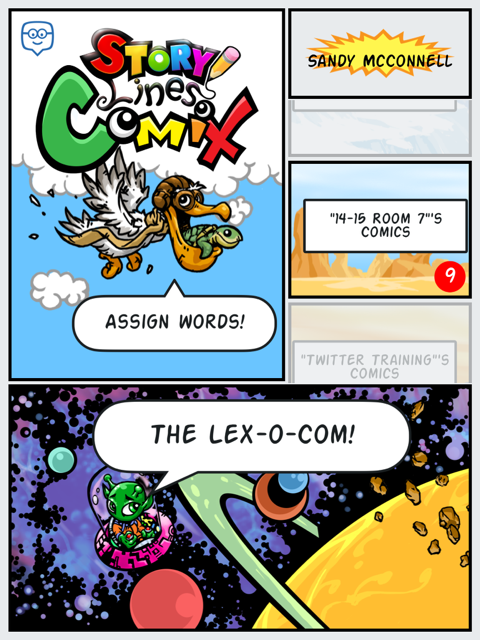
For the past couple of weeks my students and I have been playing around with Storylines Comix, another app by the responsive and creative developers at +Edmodo. Storylines Comix is an iPad only app available directly from iTunes. With this app students are able to collaborate to build and use an illustrated dictionary, the Lex-o-com.

Students have been actively engaged in discovering the meanings of words, including roots and derivations.  They also are exploring ways to tell the story of a word, using antonyms, synonyms and hyperbole.  They also are learning how not to define a word using the same word.

Beyond the vocabulary development, students are developing other 21st century skills including collaboration, critical thinking, communication, problem solving and teamwork.   Here is what we did:

Initially, I paired up my fifth graders and allowed them to explore the Storylines Comix app.  I had thought I would start with my own list of words from our latest science unit, but decided to start with easier words.  I let them self select words and then decide with their partner how to use pictures to explain the meaning of the word. Students logged into the app using their Edmodo credentials and were able to see the words I assigned, as well as search the general word list (there are over 150,000 defined words pre-populated in the app)  The kids loved the filters that enabled them to add a variety of effects to their images.  They also really liked the stickers and have asked for more.  Honestly, their first attempts at defining the words were not so good.  For example. to define lazy, they used a picture of a student lying in the grass with the speech bubble, "I am so lazy."  However, this was a teachable moment and we had a great discussion about how best to, and not to, define words.  They realized that a lot more work went into making a dictionary than they originally thoughts.  Fortunately or unfortunately, due to some district firewall issues, it turned out that students could not save these first attempts.
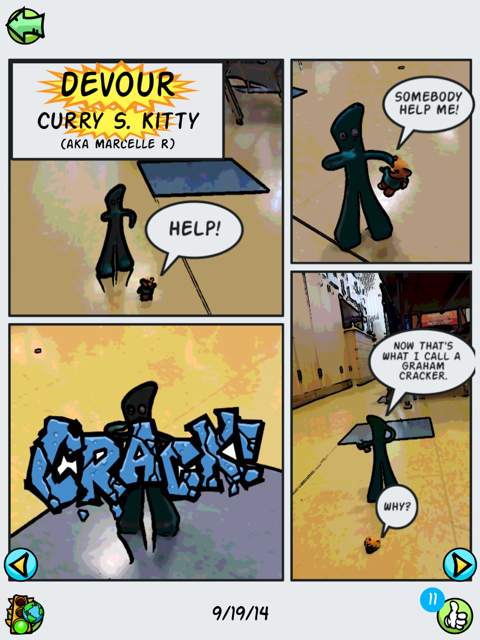
After consulting with the app developer, +Doug Banks and our IT department, the problem was resolved.  So I planned another day of word work. Students were allowed to bring small "character" toys from home to star in their comics.  We had everything from lego people to Gumby.  Students put more thought into how they would demonstrate their understanding of a word and which parts of speech were easier to 'illustrate'; I think they liked verbs best.

After students saved their Comix, they would see a yellow "stop light" which informs them their work is under review.  I can then go in and approve their comics for our class view only or to be added to the public Lex-o-com, giving them the ;green light'.  We talked about the criteria I would use to evaluate their work and when I did not approve comics, the dreaded 'red light', I was able to add a comment explaining why it was 'rejected'.  Students are then able to go in and make any adjustments to then resubmit their definition
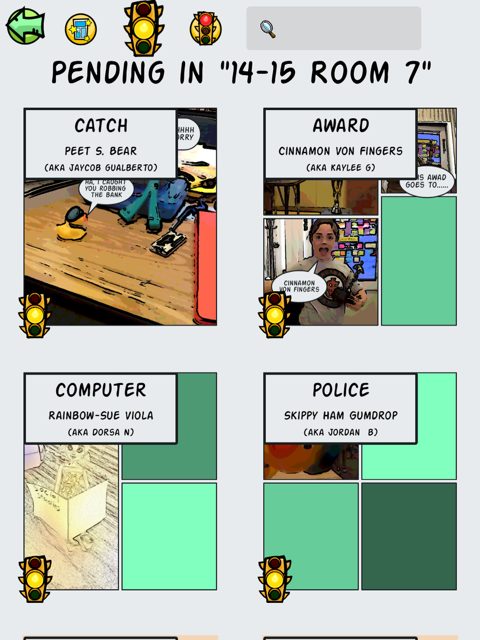
My most frequent comments were.  "I don't see how your cartoon demonstrates the meaning of the word" and, "Try not to use the word as part of the definition of that word." ,,, to the point that I found myself wishing for a drop down menu of recently used 'rejections' (I'd also like a less harsh word for the kiddos).  Nonetheless, when I showed them the comics I had rejected, they understood why and were more determined than ever to improve them. The motivation of having their work published was incredibly strong.

After definitions and comics were green-lighted, my students could go into our Room 7 dictionary to view just our approved work, and to the Lex-o-com to see which of our words I had approved for the whole world to see.  Students could give a thumbs up to "like" each others' comics and go home and share their work with their parents.

Friday my kids were super excited to have our classroom visited by Doug Banks.  He talked a little bit about the idea behind developing his app (to give students a creative way to express their knowledge) and how he came up with the funny pseudonyms the app assigns students to protect their identity. He then observed them as they worked on their comics, making suggestions and praising ideas as he went.  After each team had finished a comic, they sat down and gave feedback to Doug.  My kids felt so empowered that their voices were being heard!  Doug talked about what hard work it is coding and encouraged them to learn all they could about math and writing and art and teamwork! (No, I did NOT prep him to say that before hand.)  He left with some great firsthand feedback from real users and my kids were left with a sense of accomplishment and pride.  I don't think they ever realized they were learning!

Exit tickets from Friday.


Sunday, August 3, 2014

Using Edmodo with Younger Students: part 4 - App-a-looza

Using Edmodo with 4th and 5th graders has opened my mind to a variety of creative possibilities. After attending my second #edmodocon in person at +Edmodo headquarters, I  was challenged to begin using apps.  Having 1:1 iPads in my classroom made this endeavor easier, but there is a lot you can do with 5-10 devices, whether mobile, laptops or desktops.  Due to an incredibly difficult year, I was not as successful as I would have liked in trying new apps, but at least I dipped my toe in and am looking to dive in next month when I get my new class. Trying a variety of apps became easier when in the fall of 2013 I won the Power of One contest and was awarded a substantial amount of Edmodo app store credit to share throughout my district. At this point I was blessed with an overabundance of apps and set my students on a quest to explore and review new apps.Here are some highlights.

Some apps were great for students who had finished their work early and could work independently. My students liked Manga High's PEMDAS for math. They also liked Animal Cell, Thirteen Colonies and Slim the Ogre apps for ELA.  With a nod to gamification, they really liked when they were awarded badges automatically.  I used +Common Sense Educators Digital Passport app as a refresher whenever a student violated our classroom agreements.

Demonstrating understanding and Storytelling with Cartoons

My  students loved using +PowToon , +go animate and +Pixton Comics  We used these somewhat interchangeably, and students decided which tool they wanted to use to suit their purpose.  With GoAnimate, they realized they needed to so a lot more planning than they'd anticipated.  They realized the benefit of storyboarding, for which they used Storyboard That,  as well as editing their work.


Learnstreet - Hour of Code

Last winter we participated in the CSEDWeek/Code.org Hour of Code. We used the LearnStreet app which had a special 'course' where students could code their own holiday card.


StoryLines Pages

Inspired by the story All Good Things by Sister Helen Mrosla, StoryLines Pages asks each student to express (in one sentence) something unique that he appreciates about his classmate. In my blogpost about this project I explained how this project worked well for all abilities, and helped me identify some grammar, spelling and punctuation trends in my students.  I think this app would work well with much younger students as well.


Snapshot
I started using Snapshot after I returned to the classroom in late April.  Snapshot is a Edmodo app that helps you see  what your students know (and what they don’t). With real-time feedback and multiple ways to view results by student and standard, Snapshot helps you take the guessing out of assessing common core standards.  It was really helpful for me to get a handle on what they had learned while I was gone. I also used it to help double check meeting of standards for our report card.  This coming year I am looking forward to using Snapshot for pre- and post assessments, both on a lesson-by-lesson basis (exit tickets, etc) but also for broader concepts.

Apps I want to try

There are many apps in the Edmodo app store that I want to dive deeper into including Educlipper and instaGrok.  I also plan to use Curriculet and Subtext for reading comprehension and literature circles.

Using Edmodo with younger students has proven invaluable in helping me manage my time, increasing student engagement and providing my students with real and authentic ways to become good digital citizens.  We've participated in groups with classrooms across the country and we have an alumni group to keep connected with our past students. Edmodo is a game changer! And I feel like I have barely scratched the surface!

Thursday, July 24, 2014

Using Edmodo with Younger Students: Part 2 - 5th graders @work

I have been using +Edmodo for professional development for 4 years and with my students for the past 3 years; 4th, a 4/5 combo and then 5th grade.  (Yes, that's how I roll, something different every year.)  For the past two years I was lucky enough to loop some of my students, so I had a built in set of 'experts' when it came time to introduce Edmodo to my class.

First, let me just say the students are super excited and engaged when they get to use Edmodo. It helps them feel more responsible and accountable for their work and they really do feel more 'grown up' (soon enough, little ones, please don't rush).  As I mentioned in my earlier post, Getting Started with Edmodo, I usually start my kids with a scavenger hunt.  Not only does it help them learn how to navigate around Edmodo but while they are doing that, I get great insight into how well students can work independently, collaborate and problem solve. If I am lucky, I can also have a few minutes to insert parent codes into letters to go home that day.

My first year of working with students and Edmodo, I did not really make use of assignments or Edmodo apps. I focused solely on posting prompts to students and having them reply. I was just learning how to use Edmodo as a teacher and I wasn't really aware of its capabilities. I also wanted to gain better understanding of promises and pitfalls of using the social media platform with 8-10 year olds. The biggest thing I learned during year 1 was to do more upfront work about keeping posts RAME= Relevant, Appropriate, Meaningful, and Edited.  Because I was hyper vigilant, I was getting notifications at all hours from students typing random messages just because they could...seriously random, one kid, I swear, had his cat walk on the keyboard and he posted that at about 10:00 pm!  So I learned that I really needed to get control of their posting etiquette. I wanted to be sure, and still do, that my students had the freedom to express themselves.  But they also needed a better understanding of the fact that everyone (in our group) was reading what they were posting.  We did a lot of practice on paper and many times I reminded them, "I get an email EVERY time you post anything!"

One of my class jobs quickly became homework poster.  Since I rarely teach the same thing two years in a row, it is not always easy for me to predict homework enough to be able to post it on a webpage a week in advance.  Daily, while we are filling out our paper planners, one student posts the homework to our class group on Edmodo.  That afternoon, I will copy and share that post again to the group as well as to their parents.  Often a student will forget a homework page or be absent, and Edmodo comes to the rescue.  My students have taken pictures of a math page and posted it to Edmodo so that another student could complete her own homework.  They will also ask for help or clarification. More often than not, they clear up any confusion before I even have a chance to respond.  And if they can't, then I have pretty good feedback that a certain assignment was confusing or difficult.

I did start using the assignment feature simply to manually record who did and didn't finish certain assignments, just to give students and parents an idea of progress and where intervention might be needed.

For classroom use that first year, I often used Edmodo posts for response to literature and to gauge understanding of a concept or prompt discussions in science, social studies or math.  Students also quickly learned how to share their work including +Google  docs, videos made with +Educreations and more. About a third of the way through the year, we received our iPads, as part of an initial rollout of the Cambrian iPad Academy.  This was a game changer in many ways.  As it relates to Edmodo, it meant that students had instant access to their accounts, rather than having to wait for the C.O.W. (computer on wheels) to roll in, or for our old, slow desktop PCs to boot.I played around a little bit more with assignments, quizzes and polls and my students were incredibly patient and forgiving.


Edmodo has incredible and vast capabilities and potential, however my advice for year one implementation is to start small. Stick with just a few key areas and learn what works for you and what doesn't.  The summer after my first year of Edmodo+students, I virtually attended #edmodocon... who doesn't love PD that starts in my jammies and ends with a glass of wine! This year, Edmodocon2014 is being held August 6th and I strongly recommend you reserve your spot today!  My head about exploded with all of the ideas and I couldn't wait to get back to school to try them out.

Coming up soon - Using Edmodo: Year Two and Beyond!


Using Edmodo with Younger Students - part 1: Getting Started

I suppose I am what you'd call an +Edmodo  power user in our district.  I am an Edmodo Certified Teacher and an Edmodo Support Ambassador, I have the t-shirts to prove it. I am often asked how I use Edmodo with my fifth grade students and how I would use it in even younger classrooms. So here are some ideas and what I have found to be best practices.

In my first day letter to parents, I include information about digital citizenship, technology use in general and how we will be using Edmodo in the classroom. I always start out the year with two weeks of #digicit lessons from +Common Sense Educators .  Students earn their passports by completing all of the lessons with me.  I then introduce them to Edmodo.   I do compare it to Facebook to give them a frame of reference and we discuss the differences: Edmodo is first and foremost is a safe and secure learning community.  We talk about what it means to be safe and secure. Then we focus on the fact that it is a learning community.  Not all teachers choose to allow their students to post 'personal' or non school related comments and it is something you should decide on before you introduce Edmodo.  While I do allow my students to post non-academic content from home, they know that they will lose privileges if they are socializing via Edmodo during school hours. And even though all notes (posts) are time stamped, some kids still seem surprised when I know that have posted, "'s'up" during class.

Next we have an extensive discussion on how/what to post and comment.  We use the acronym RAME - is is relevant, appropriate, meaningful, and edited.  We discuss Socrates three sieves - is it true, good and necessary.  We then use the expanded, child friendly acrostic THINK - is it true? helpful? interesting or inspiring? necessary? kind?  We do some role playing and I remind them that if they wouldn't say it to someones face, with me in earshot, then they shouldn't write it in Edmodo.

After all this talking, they are anxious to get started.  At this point, I have already created a group for my class, usually called something like '14-15 Room 7' Each group has a unique join code that new student users will need to sign up for Edmodo and existing users will need to join the class.  Generally, my students are new to Edmodo so they will need to create a student account. Even if they have an email, I do not have them enter it, since they are under 13 years old and technically not allowed to have email accounts.  I also do not allow them to use their last names.  I used to but then one of my previous students pointed out that she was at the public library using Edmodo and her name was all the screen for any passerby to see.  So now I have them use an alias. One year I used our school name for all of their last names.  Last year we had faux twitter handles, so they could use that for their name. Another teacher I know uses her last name for the kids' names, and then when they go on to another grade they change their last name (which avoids too many Jennifer School-name instances).  It is fairly easy to change a name after creating an account.

I initially start out my students as "read only", not contributors, that way they can see what I post but they cannot yet post.  It is easy to change this later, when you are ready, via the group members page. Their first activity after logging in, is an Edmodo scavenger hunt to familiarize them with basic features.  In the past I have used +Melissa Butler 's Livebinder Scavenger Hunt. If you use it, you will need to change students to contributor when they reach step 4. Be aware that Edmodo has redesigned some of their pages so although the activity will be the same, they look of the page might not match. That said, Melissa's +LiveBinders is a great resource!

That night's homework assignment is to tell their parent's about Edmodo and help them sign up as parents. I generate parent letters that include an overview of Edmodo, how we will be using it in class, and instructions for creating parent accounts, including their unique Parent code (associated with their child).  You cannot finalize the letter until the child has created their own account.  If  families do not have access at home, I invite parents to come early to Back to School Night and I will help them get started. I usually give a prize to the child whose parents are first to sign up and I award a badge to all students who have their parent or guardian sign up. It is easy to tell because that child's profile will have a parent icon by their name, on the same member's page where you can assign badges!

Some primary grade teachers have skipped having pre-writing students sign up and just had parents sign up as students to facilitate parent communication.  This causes slight problems in later years when that parent wants to associate their own email ID with a parent account.  This can be fixed but a better solution would be to avoid creating the problem.  Have a parent or an aide help you create student accounts for your class. This will generate the parent code for each child. Then the parents will sign up and you can now communicate with them as a group. The difference is that as "students" they can post to you and as "parents" they cannot.

Earlier in July I co-hosted an #edmodochat about using Edmodo with younger students.  The transcript of that chat was +Storify 'd - see below.  Coming up next: Edmodo With Younger Students - Part 2 year one 5th graders at work


Friday, August 30, 2013

Why I love teaching #9 - Out of My Mind

Honestly, I don't know where it fits in the ranking, but this one is pretty high up there.  A little background is helpful.  My sister +Sharon Buehler is a school librarian in Oregon. She often gives me book recommendations and she knew of my inclusive education practices, so she suggested I read Out of My Mind, by Sharon Draper (OOMM). I bought it over a year ago but didn't get around to reading it, so I brought it to school to add to my classroom library.  Last year, one of my most reflective and deep readers asked what she should read, so I suggested OOMM. She came in the following Monday and said, "Oh Mrs. McConnell, you HAVE to read this book, and read it to the class, too!"  I dutifully took it home and added it to my summer reading stack.

Fast forward a bit to this past summer, and I read the book. In a day.  It was, to say the least, compelling. OOMM is an incredible story of inclusion and acceptance told from the eyes of a child.  I knew I would start my year reading it aloud to our kids.  About a week later, I stumbled across a tweet by +Pernille Ripp about something called The Global Read aloud (GRA), which she started a few years back. This year, the one book to connect the world, at least for my grade level, is OOMM! I knew we had to participate.  It is an incredible opportunity to share and discuss this powerful book with a wider group of students. Since I am super lucky to be a part of our 1:1 iPad program, I knew the kids would be able to easily collaborate and communicate with their 'colleagues' in other parts of the world using technologies such as +Edmodo , +Skype, +Kidblog  and even Twitter (with a teacher, of course).

I set about acquiring enough copies of the book for all 35 of our inclusive ed. kids to read. I co-teach +sheila monger who provides services to students with special needs.  Our kids are together every day for at least part of each day.

I ordered 5 copies with a B&N gift card I'd received at the end of the last school year. Then I went to my trusted fundraiser, Adopt-a-Classroom, and raised money to buy more books there. I put the word out via Facebook and my class web page.  One of my friends shipped me 12 books, just because she cares about public education and inclusion.  One of the parents of a student bought her daughter a copy and 2 extra copies for our classroom.  Gratefully, I should have enough books for each child to read their own copy.

Since we are participating in GRA13, I asked my kids not to read the book ahead of time (if they hadn't already) since we'd be making predictions with our global classmates.  Today, the child of the parent who bought the books for us came in and slipped this note on my desk.


 And this, my friends, is on of the many reasons I love teaching.


Friday, July 12, 2013

My 11+1 Essential Tools for using Social Networking as Professional Development

"Real PD starts with wanting 2 learn Not with learning something once for one hour once a year Take control of your profession" Tim Charleston (@MrCsays)

In May, I presented at the iPARA Expo in Los Gatos, CA.  My topic was the opportunity that social media and networking provides for educators. I started with what I know...after some thought I realized I use at a minimum 9 different social media tools every week day!  I sure thought computers were supposed to simplify our lives!  Here is a screen shot of just the apps I use, not to mention the websites.


  1. edmodo - In addition to using +Edmodo to communicate with students and parents, I also use communities and groups to connect with other educators and learn about new ways to integrate technology with curriculum.
  2. Twitter - I read twitter like some people read the news. I check it daily to see what new things are going on with education and technology (#edchat).. In his post, Twitterati: Progressive EDU leaders or outliers?  Tom Whitby writes Today’s technological tools for collaboration now enable it globally, timelessly, and virtually endlessly. The key factor in good and effective collaboration is connecting with right sources. 
  3. Youtube is a great resource for teachers and students. I have not yet begun to tap into its vastness of instructional and professional development videos.
  4. Blogs - Not only do I write for reflection but I also follow several other bloggers in the field of education.  Grace from Teacher Learning Community suggests: Reflect on your work from time to time by blogging about your experiences. Decide what has worked and what hasn’t? What should you do different next time? You can always draw from other people’s expertise as well. Social media is all about collaboration, and what better way to do that then by teaching and learning from other passionate educators?  Then share your blog with your colleagues. Build a list of blogs to read for professional development purposes…and make sure you subscribe to them so you know when they’ve posted new content. There are many teaching related blogs out there.
  5. Wikis - I use wikispaces as a repository of information. Our current wiki is managed by a group of us involved in a 1:1 iPad pilot. 
  6. facebook -I do not use this yet for professional purposes but this year plan to use a professional page/profile for parent communications
  7. google + -   I find this a better source of professional information than facebook.
  8. diigo - social bookmarking -   Not only can I save my bookmarks for use from any machine, bt I can also see what others are bookmarking and find new and interesting 
  9.  Pinterest  Simply a great source of ideas!
  10. LinkedIn and Tioki, which is kind of like a linkedin for educators, connects users with job opportunities. 
  11. Edshelf -  -Find the right educational tools for your needs - Reviews and recommendations of tools for education
  12. This just in - Graphite, a recently launched resource from +Common Sense Educators, provides curated recommendations and reviews of educational apps and tools.


Jason Tomassini from Education Week  suggests via the Huffington Post that teachers check Twitter for hashtags related to education technology, elementary education, and 1-to-1 computing initiatives featuring iPads. He found what is certainly true for this teacher, that we use Facebook in our personal life but we aren't on Facebook with our "teacher hats on."  I know for me I am more likely to use a designed for teachers and not likely one frequented by my students, current or past.  I don't even accept friend requests from parents of my current students. I know they can see my posts in a roundabout way, but it is just a line I have drawn for myself.


Eric Sheninger, "online idea-sharing tools like RSS feeds, digital discussion forums, and blogs have the power to expand PLNs to previously unimaginable sizes. By using social media tools such as Twitter, social bookmarking sites, and social networks, educators can participate in the new era of professional development—an era of idea exchange that is accessible anywhere, anytime and that connects the field’s brightest minds. These tools are real-time, cost-effective, and accessible around the world, and they are driven by practitioners, not just consultants. 

Social media–facilitated idea sharing and online personal learning networks also bypass the challenges of traditional professional development, including time and money constraints, uninterested participants, and an overemphasis on irrelevant or boring content. 

 George Couros ‏@gcouros  "Connecting on Twitter has not only created higher expectations for myself in education, but for people in general. So much awesome out there"

Indeed!


Sunday, March 17, 2013

Technology for Planning and Teaching to the Common Core

Brian Balaris, Chris Morel, Todd Reed
As you are implementing technology, there are several ways to provide necessary Staff PD to help inspire, prepare and support your teachers.   In their district, they use independent contractors and send teachers to conferences to see what is going on
  • boot camp - at the beginning of their school year, one day (paid) is devoted to technology training using a boot camp model. There are a variety of workshops that people can sign up for. They get low or no cost presenters (the price of lunch for some) and teachers can sign up for the things they need, such as Google sites, Google forms, iPad basics, SMART, Edmodo, etc.  
  • Site early outs - on some of their early out Wednesdays, they continue with the staff PD for tech, which is especially helpful as teachers have begun using the technology and have some new and more complex questions and challenges.  
  • Grade level pull outs - these would address specific grade level needs
  • Pedagogical PD

ITSE NETS   (National Education Technology Standards) for Students NETS-S and teachers NETS-T - It is essential to know technology standards for teachers and students and use them in backwards planning of units and your school year. Here is an interesting resource I found while poking around ITSE , an implementation wiki for NETS standards! They also recommend a coaching model - to provide help with how to, to model lessons, research and share new ideas, generally, to spread the wealth. Coaches can take what they see at one school, one classroom and pollinate it throughout their district. 

This session blurb said it would  "provide teachers and administrators with a detailed understanding of the technology needs embedded in the common core and how to start the process of using these skills. The integration of more technology into engaging teaching and learning activities are the themes presented." My slight frustration with this year's CUE started with this presentation. I know WHY we need to use technology with common core, I want to know HOW to best implement real projects with tech+common core!  They had some great ideas to support staff using technology, but no actual projects, lesson plans, nor implementable strategies.  I am hoping to follow Balaris, Morel and Reed and do some investigation into how they actually are implementing tech+CCSS in their schools going forward.

Friday, January 4, 2013

#EdTech Reflections from 2012


It's the beginning of a new year, a time for looking back and a time for crystal ball gazing. On twitter +Vicki Davis,  suggested: Write a 2012 year in review about what you've done, where you've been, and the joys of the year. Take time to remember. In honor of 2012, I reflected on on my top 12 highlights from the year. As I am continually trying for life/work balance, some of the highlights are related to my teaching practice, and some are purely personal. All 12 can be found on my life+teaching blog, but since five of them are related in some way to our iPad Academy adventures, I am sharing them here, too.


1. iPads in the classroom: In March, I applied to and was accepted into the iPad Action Research Academy  in our school district. We received our class set of iPads in April and my students have been engaged ever since. I started a blog to keep track of our experiences and have had the opportunity to work with an amazing team of innovators as we have pioneered use of this technology in our district. As a group we have used a wiki and primarily Edmodo to communicate, problem solve and collaborate. It really has been a game changer for me, my students and my colleagues.

5. Since I have started teaching, I have been lucky to work with some amazing educators whose focus is special needs kids: Bill Theimann, Linda Bruton, Julie Paolini and a supportive staff and administration.  I had just assumed that their approach of compassion, inclusion and treating all students as learners was the norm.  When I left SUSD I found that was not the case. However, I was brilliantly lucky to be placed in a room next door to the new SDC teacher, Sheila Monger. Monger, an inclusion specialist, shares my views and passion for creating a seamless education environment where all students learning needs are met.  This school year, I am teaching a 4+5 combo and Monger is teaching 2+3+4+5. Having more of an overlap has opened the doors for more integration and inclusion.  Together, we are gradually breaking down barriers and opening doors for opportunity for teachers, administration and students look at learning a new way.http://mrsmcconnellsblog.blogspot.com/2012/05/technology-and-inclusive-education.html 


8.  Education + Technology = #EdTech: When I decided to become a teacher, my vision was to use what I had learned "in the real world" to help me be a better teacher.  I have worked hard, and spent a lot of my own time and money, to find meaningful ways to bring technology into the classroom to provide my students with authentic learning experiences.  When I had to leave SUSD, I was afraid I'd have to start from zero to re-establish myself as a technology leader with my new district. At my age, (really at any age) starting from zero seems like a grand waste of time.  One of my favorite expressions is that I'd rather ask for forgiveness than ask for permission.  As a manager, I respected the initiative that showed. As a teacher I appreciate the perceived independence, even though I know it can sometimes frustrate my principals.  So, I just did what I do and kept my principal informed.  Through programs like CreaTV and the iPad Academy, I have been able to flex my tech muscles while providing our students with unique learning opportunities. I have also been in a position to help develop other teachers as they learn how to use technology to become more efficient and effective educators. In January, +sheila monger  and I were honored with a Good Apple Award by our school board and recognized for our contribution in the area of educational technology.  I am very proud of the work we have done to help teachers and students use technology in meaningful ways.

10.  In October of this year I applied to and was accepted into another academy at our district. Cambrian and others use the academy model as a choice method for professional development (see page 32).  This time it is the Digital Media Academy.  I saw this as a great opportunity to merge my work with CreaTV and classroom learning using digital media.  Our students have started out by producing short PSAs  addressing personal concerns such as playground safety, littering, and bullying.  We have been able to use student created content on our monthly television show on CreaTV, Comcast channel 28,  Around Bagby.  Our students are becoming better planners, writers, problem solvers, communicators and collaborators.

12. Assessment. As I started this year end review with iPads, I'm ending with them.  While initially I used the iPads for student engagement and learning, I also used student work on the iPads for informal assessment.  However, I wanted to learn more (and still do) about ways I can use the devices to effectively assess student learning.  In August, with the help of +Jill Florant  at Edmodo, I started using Edmodo not only to communicate with my parents and students but also to assess their learning. I started using assessments and quizzes. Parents are able to see their child's progress and it really has improved the home-school connection.  In addition to Edmodo, I also started using Class Dojo for behavior management.  The kids love their avatars and work hard for positive behavior reports.  This fall I used adopt-a-classroom to generate crowd-funding for SpellingCity and our collaborative weather project.  SpellingCity helps administer spelling practice activities and tests, grades the tests and provides useful reports to me and the parents.  In 2013 I plan to further investigate and utilize methods for assessing student learning and engagement on iPads.

Happy New Year!