Showing posts with label 21stCentury Skills. Show all posts

Sunday, October 4, 2015

#twittertuesday for Elementary School Students


For the last several years, my co-teacher, +sheila monger and I have been using +Twitter with my fourth and fifth grade students. It provides and authentic writing experience with practice in succinctly capturing a main idea or essence. We encourage their parents to follow us and they work really hard to do their best work for this wider audience. I try to keep an eye on the twittersphere for trending hashtags and use them if applicable to link to current events. For example  On #GSPD we _________________ (global school play day) .I limit them to  ½ 140 or 70 characters...they have to fit it on the paper and I have to be able to read it from across the room.

egg.jpgLogistics

Before the school year starts, I laminate 30 pieces of paper that fit on my back cabinets.  I create a handle for each student using the first few letters of their first and last name. For example Sandra McConnell would be SanMc. I write their handles and glue them to a name tag with an Egg, showing they are a new user on twitter. As the year progresses, some students created new avatars for themselves.

Be sure to start the year with digital citizenship lessons. We rely on +Common Sense Education lessons. We also use the acronym RAMENN with our kids. When posting make sure it's
R - relevant
A - appropriate
M - meaningful
E - edited - and our students added the last two...
N - is it nice?
N - is it necessary?


Each Tuesday I post the prompt and give students time to generate ideas and write. Sometimes the prompts generate a lot of reflection, other times not so much. After most of the tweets are posted to the wall, my tweeter of the week, a classroom job, chooses one to five posts that they want to have represent our class.  They rewrite the prompt in their journal (or take a picture with their iPad) and bring it to my computer to type into our class account in twitter, @mrsmccsclass. Often I will have them include photographs of the students’ tweets to include in the tweet. I have them do it at my computer because I do not want the students to have unrestricted, unsupervised access to twitter.


Although I am not in my classroom this year, our account is still active and you can see what other types of things we post.

General Student Instructions

  1. write a draft of the tweet in your journal. Be sure to include a hashtag summarizing or emphasizing your main idea. Proofread.
  2. have your post checked by an adult
  3. make edits, then with pencil, write your tweet on twitter paper
  4. go over letters with a marker (no more than two colors)
  5. post in the wall with blue tape at your @handle

Have fun with it! For sample prompts, visit this google doc.


Saturday, September 20, 2014

Growing Academic Vocabulary with Storylines Comix

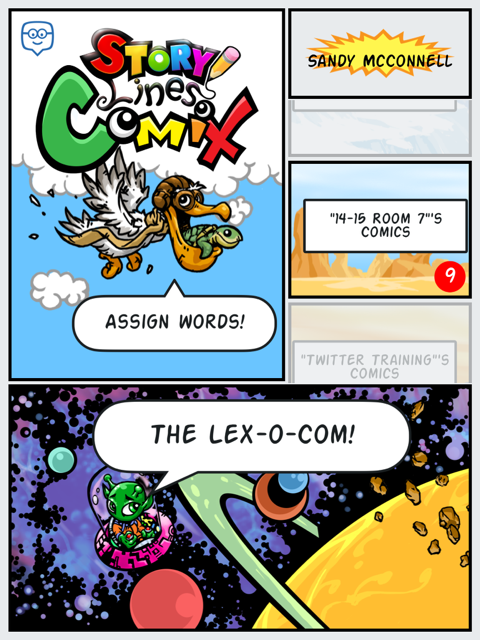
For the past couple of weeks my students and I have been playing around with Storylines Comix, another app by the responsive and creative developers at +Edmodo. Storylines Comix is an iPad only app available directly from iTunes. With this app students are able to collaborate to build and use an illustrated dictionary, the Lex-o-com.

Students have been actively engaged in discovering the meanings of words, including roots and derivations.  They also are exploring ways to tell the story of a word, using antonyms, synonyms and hyperbole.  They also are learning how not to define a word using the same word.

Beyond the vocabulary development, students are developing other 21st century skills including collaboration, critical thinking, communication, problem solving and teamwork.   Here is what we did:

Initially, I paired up my fifth graders and allowed them to explore the Storylines Comix app.  I had thought I would start with my own list of words from our latest science unit, but decided to start with easier words.  I let them self select words and then decide with their partner how to use pictures to explain the meaning of the word. Students logged into the app using their Edmodo credentials and were able to see the words I assigned, as well as search the general word list (there are over 150,000 defined words pre-populated in the app)  The kids loved the filters that enabled them to add a variety of effects to their images.  They also really liked the stickers and have asked for more.  Honestly, their first attempts at defining the words were not so good.  For example. to define lazy, they used a picture of a student lying in the grass with the speech bubble, "I am so lazy."  However, this was a teachable moment and we had a great discussion about how best to, and not to, define words.  They realized that a lot more work went into making a dictionary than they originally thoughts.  Fortunately or unfortunately, due to some district firewall issues, it turned out that students could not save these first attempts.

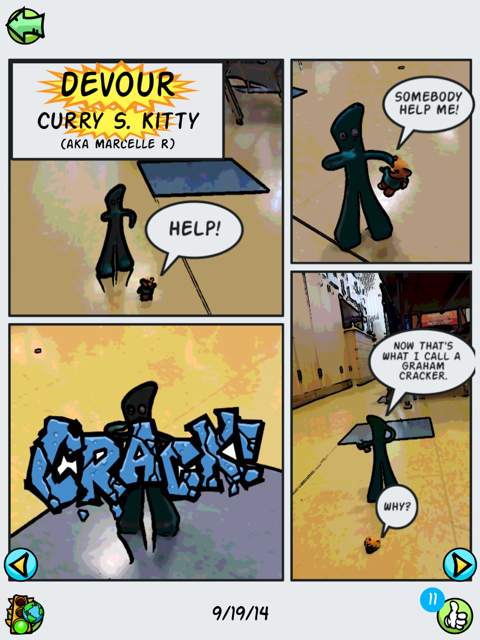
After consulting with the app developer, +Doug Banks and our IT department, the problem was resolved.  So I planned another day of word work. Students were allowed to bring small "character" toys from home to star in their comics.  We had everything from lego people to Gumby.  Students put more thought into how they would demonstrate their understanding of a word and which parts of speech were easier to 'illustrate'; I think they liked verbs best.

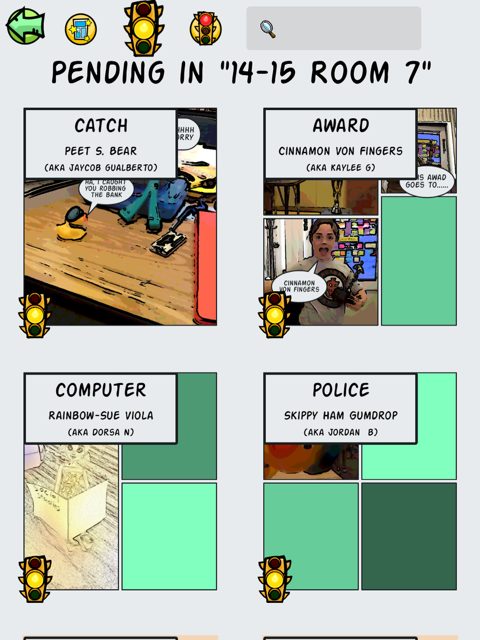
After students saved their Comix, they would see a yellow "stop light" which informs them their work is under review.  I can then go in and approve their comics for our class view only or to be added to the public Lex-o-com, giving them the ;green light'.  We talked about the criteria I would use to evaluate their work and when I did not approve comics, the dreaded 'red light', I was able to add a comment explaining why it was 'rejected'.  Students are then able to go in and make any adjustments to then resubmit their definition

My most frequent comments were.  "I don't see how your cartoon demonstrates the meaning of the word" and, "Try not to use the word as part of the definition of that word." ,,, to the point that I found myself wishing for a drop down menu of recently used 'rejections' (I'd also like a less harsh word for the kiddos).  Nonetheless, when I showed them the comics I had rejected, they understood why and were more determined than ever to improve them. The motivation of having their work published was incredibly strong.

After definitions and comics were green-lighted, my students could go into our Room 7 dictionary to view just our approved work, and to the Lex-o-com to see which of our words I had approved for the whole world to see.  Students could give a thumbs up to "like" each others' comics and go home and share their work with their parents.

Friday my kids were super excited to have our classroom visited by Doug Banks.  He talked a little bit about the idea behind developing his app (to give students a creative way to express their knowledge) and how he came up with the funny pseudonyms the app assigns students to protect their identity. He then observed them as they worked on their comics, making suggestions and praising ideas as he went.  After each team had finished a comic, they sat down and gave feedback to Doug.  My kids felt so empowered that their voices were being heard!  Doug talked about what hard work it is coding and encouraged them to learn all they could about math and writing and art and teamwork! (No, I did NOT prep him to say that before hand.)  He left with some great firsthand feedback from real users and my kids were left with a sense of accomplishment and pride.  I don't think they ever realized they were learning!

Exit tickets from Friday.


Thursday, July 24, 2014

Using Edmodo with Younger Students: Part 2 - 5th graders @work

I have been using +Edmodo for professional development for 4 years and with my students for the past 3 years; 4th, a 4/5 combo and then 5th grade.  (Yes, that's how I roll, something different every year.)  For the past two years I was lucky enough to loop some of my students, so I had a built in set of 'experts' when it came time to introduce Edmodo to my class.

First, let me just say the students are super excited and engaged when they get to use Edmodo. It helps them feel more responsible and accountable for their work and they really do feel more 'grown up' (soon enough, little ones, please don't rush).  As I mentioned in my earlier post, Getting Started with Edmodo, I usually start my kids with a scavenger hunt.  Not only does it help them learn how to navigate around Edmodo but while they are doing that, I get great insight into how well students can work independently, collaborate and problem solve. If I am lucky, I can also have a few minutes to insert parent codes into letters to go home that day.

My first year of working with students and Edmodo, I did not really make use of assignments or Edmodo apps. I focused solely on posting prompts to students and having them reply. I was just learning how to use Edmodo as a teacher and I wasn't really aware of its capabilities. I also wanted to gain better understanding of promises and pitfalls of using the social media platform with 8-10 year olds. The biggest thing I learned during year 1 was to do more upfront work about keeping posts RAME= Relevant, Appropriate, Meaningful, and Edited.  Because I was hyper vigilant, I was getting notifications at all hours from students typing random messages just because they could...seriously random, one kid, I swear, had his cat walk on the keyboard and he posted that at about 10:00 pm!  So I learned that I really needed to get control of their posting etiquette. I wanted to be sure, and still do, that my students had the freedom to express themselves.  But they also needed a better understanding of the fact that everyone (in our group) was reading what they were posting.  We did a lot of practice on paper and many times I reminded them, "I get an email EVERY time you post anything!"

One of my class jobs quickly became homework poster.  Since I rarely teach the same thing two years in a row, it is not always easy for me to predict homework enough to be able to post it on a webpage a week in advance.  Daily, while we are filling out our paper planners, one student posts the homework to our class group on Edmodo.  That afternoon, I will copy and share that post again to the group as well as to their parents.  Often a student will forget a homework page or be absent, and Edmodo comes to the rescue.  My students have taken pictures of a math page and posted it to Edmodo so that another student could complete her own homework.  They will also ask for help or clarification. More often than not, they clear up any confusion before I even have a chance to respond.  And if they can't, then I have pretty good feedback that a certain assignment was confusing or difficult.

I did start using the assignment feature simply to manually record who did and didn't finish certain assignments, just to give students and parents an idea of progress and where intervention might be needed.

For classroom use that first year, I often used Edmodo posts for response to literature and to gauge understanding of a concept or prompt discussions in science, social studies or math.  Students also quickly learned how to share their work including +Google  docs, videos made with +Educreations and more. About a third of the way through the year, we received our iPads, as part of an initial rollout of the Cambrian iPad Academy.  This was a game changer in many ways.  As it relates to Edmodo, it meant that students had instant access to their accounts, rather than having to wait for the C.O.W. (computer on wheels) to roll in, or for our old, slow desktop PCs to boot.I played around a little bit more with assignments, quizzes and polls and my students were incredibly patient and forgiving.


Edmodo has incredible and vast capabilities and potential, however my advice for year one implementation is to start small. Stick with just a few key areas and learn what works for you and what doesn't.  The summer after my first year of Edmodo+students, I virtually attended #edmodocon... who doesn't love PD that starts in my jammies and ends with a glass of wine! This year, Edmodocon2014 is being held August 6th and I strongly recommend you reserve your spot today!  My head about exploded with all of the ideas and I couldn't wait to get back to school to try them out.

Coming up soon - Using Edmodo: Year Two and Beyond!


Saturday, June 21, 2014

Bon Voyage to a Great Leader


I am taking time out from my usual #edchat to recognize the incredible contribution superintendent Dr. Debbie Blow has made to our district and to me personally. Dr. Blow is moving to a new district where she can be closer to her family. I will miss her inspirationinfluence and energy.  For each of the three years since I was laid off from my tenured position in my previous district, I have been invited back to an open position. Once again this year I explained to them that until they could offer me the environment and opportunities that Cambrian has offered me, ....thanks but no thanks, I'm staying in Cambrian, even without tenure. Cambrian is that special of a place.

http://www.electricdatasystems.com/
As a "founding" member of the iPad academy, I am part of a team of 6 passionate and courageous teachers, all of us learning as we went along side by side with +Kirby Fell and Dr. Blow.  She showed extraordinary vision, leadership and enthusiasm as she gave us the tools we needed to proceed and then took her seat along side us while we flew the plane while building it.  As a great leader does, she trusted her team, and gave us the freedom to discover and develop best practices. We created a successful iPad Academy model that now includes 41 classroom teachers with 1:1 iPads. Our Home and School Clubs have purchased an additional 300 or so devices for teacher and classroom use.  For the upcoming 5th iPad academy cohort, there were 23 applications for an available 12 slots.

Having the iPads has truly revolutionized and reenergized my practice and my classroom. After 2.5 years I cannot imagine teaching without them now. Using this tool, our students are reading, writing, explaining their thinking in math and science, going on virtual field trips and even coding in meaningful, authentic and thus engaging ways.  Yes, they could have done much of it without the iPad, but the iPad is more captivating, genuine and helps prepare our students for their futures.  Our first cohort of "iPaddians" paved the way, researching, documenting and sharing best practices. We created a wiki to share what we've learned with our colleagues.  This was all under Dr. Blow's leadership.

+Tanya Prive writes in Forbes that there are top 10 qualities that make a good leader
  • Honesty
  • Ability to delegate
  • Communication
  • Sense of humor     
  • Confidence               
  • Commitment
  • Positive attitude    
  • Creativity               
  • Intuition 
  • The ability to inspire 

Having a background in executive management, I can tell you how critical Dr. Blow's leadership has been in the successful implementation of our 21st century strategies.  As our board moves forward with their selection of a new superintendent, I hope they will seek someone with at least some of her leadership qualities, so that we don't lose the momentum we have all worked so hard to gain. Developing global citizens with 21st century skills is one of the pillars of our strategic plan and it is my hope that the school board and new superintendent will continue support of our academies and professional development in Educational technology to help sustain this effort.

Dr. Debbie Blow possesses all of the Forbes 10 qualities and although she is one of a kind and amazing, the board would do well to find someone who can continue to provide the kind of leadership, vision and commitment that Dr. Blow seems to provide so effortlessly.  I hope they do not lose sight of her vision. She has been, and even in her decision to leave, continues to be, an inspiration to me.  

Dr. Blow, You will be missed.

Friday, August 30, 2013

Why I love teaching #9 - Out of My Mind

Honestly, I don't know where it fits in the ranking, but this one is pretty high up there.  A little background is helpful.  My sister +Sharon Buehler is a school librarian in Oregon. She often gives me book recommendations and she knew of my inclusive education practices, so she suggested I read Out of My Mind, by Sharon Draper (OOMM). I bought it over a year ago but didn't get around to reading it, so I brought it to school to add to my classroom library.  Last year, one of my most reflective and deep readers asked what she should read, so I suggested OOMM. She came in the following Monday and said, "Oh Mrs. McConnell, you HAVE to read this book, and read it to the class, too!"  I dutifully took it home and added it to my summer reading stack.

Fast forward a bit to this past summer, and I read the book. In a day.  It was, to say the least, compelling. OOMM is an incredible story of inclusion and acceptance told from the eyes of a child.  I knew I would start my year reading it aloud to our kids.  About a week later, I stumbled across a tweet by +Pernille Ripp about something called The Global Read aloud (GRA), which she started a few years back. This year, the one book to connect the world, at least for my grade level, is OOMM! I knew we had to participate.  It is an incredible opportunity to share and discuss this powerful book with a wider group of students. Since I am super lucky to be a part of our 1:1 iPad program, I knew the kids would be able to easily collaborate and communicate with their 'colleagues' in other parts of the world using technologies such as +Edmodo , +Skype, +Kidblog  and even Twitter (with a teacher, of course).

I set about acquiring enough copies of the book for all 35 of our inclusive ed. kids to read. I co-teach +sheila monger who provides services to students with special needs.  Our kids are together every day for at least part of each day.

I ordered 5 copies with a B&N gift card I'd received at the end of the last school year. Then I went to my trusted fundraiser, Adopt-a-Classroom, and raised money to buy more books there. I put the word out via Facebook and my class web page.  One of my friends shipped me 12 books, just because she cares about public education and inclusion.  One of the parents of a student bought her daughter a copy and 2 extra copies for our classroom.  Gratefully, I should have enough books for each child to read their own copy.

Since we are participating in GRA13, I asked my kids not to read the book ahead of time (if they hadn't already) since we'd be making predictions with our global classmates.  Today, the child of the parent who bought the books for us came in and slipped this note on my desk.


 And this, my friends, is on of the many reasons I love teaching.


Saturday, January 12, 2013

3 Classroom Apps for the New Year

Thanks HRM for the artwork!
This week I introduced my kids to three new apps which I am hoping will provide me with additional assessment information. We started a class blog using kidblog.  It is a secure blogging platform that my kids can use to create their own blog page within our group.  So far we wrote about our winter break and we've started with doing our weekly reading log online.  I am learning more about my students' writing and they are learning from each other.  There is an app for easy access to the blog from our class iPads. I am hoping that blogging will provide an opportunity for communication, collaboration and developing authentic writing skills.  My kids know that I blog, too. It helps them to see that writing is a life-ling skill.
We also started playing around with Khan Academy. Although I did the set up on my Mac, the kids and I are now using the app.  I know Khan has its detractors, and I am remaining open minded as I pilot its usefulness in my classroom.  I teach a 4+5 combo with very independent learners and I am hoping that Khan Academy will allow my students the ability to go deeper into subjects in which they have a need and or interest.


As part of our monthly life-skill focus of kindness, my students have begun a Kindness Project. We brainstormed a variety of ways that we see or hear kindness.  We are now working on developing icons or memes to represent kindness.  One of the tools we are using to draw them is the third app we started using: Skitch, which is part of Evernote.  Some students are also working on short movies to inspire kindness. We were inspired by this video from +Dan Pink 's daughter, Sophia.

Friday, January 4, 2013

#EdTech Reflections from 2012


It's the beginning of a new year, a time for looking back and a time for crystal ball gazing. On twitter +Vicki Davis,  suggested: Write a 2012 year in review about what you've done, where you've been, and the joys of the year. Take time to remember. In honor of 2012, I reflected on on my top 12 highlights from the year. As I am continually trying for life/work balance, some of the highlights are related to my teaching practice, and some are purely personal. All 12 can be found on my life+teaching blog, but since five of them are related in some way to our iPad Academy adventures, I am sharing them here, too.


1. iPads in the classroom: In March, I applied to and was accepted into the iPad Action Research Academy  in our school district. We received our class set of iPads in April and my students have been engaged ever since. I started a blog to keep track of our experiences and have had the opportunity to work with an amazing team of innovators as we have pioneered use of this technology in our district. As a group we have used a wiki and primarily Edmodo to communicate, problem solve and collaborate. It really has been a game changer for me, my students and my colleagues.

5. Since I have started teaching, I have been lucky to work with some amazing educators whose focus is special needs kids: Bill Theimann, Linda Bruton, Julie Paolini and a supportive staff and administration.  I had just assumed that their approach of compassion, inclusion and treating all students as learners was the norm.  When I left SUSD I found that was not the case. However, I was brilliantly lucky to be placed in a room next door to the new SDC teacher, Sheila Monger. Monger, an inclusion specialist, shares my views and passion for creating a seamless education environment where all students learning needs are met.  This school year, I am teaching a 4+5 combo and Monger is teaching 2+3+4+5. Having more of an overlap has opened the doors for more integration and inclusion.  Together, we are gradually breaking down barriers and opening doors for opportunity for teachers, administration and students look at learning a new way.http://mrsmcconnellsblog.blogspot.com/2012/05/technology-and-inclusive-education.html 


8.  Education + Technology = #EdTech: When I decided to become a teacher, my vision was to use what I had learned "in the real world" to help me be a better teacher.  I have worked hard, and spent a lot of my own time and money, to find meaningful ways to bring technology into the classroom to provide my students with authentic learning experiences.  When I had to leave SUSD, I was afraid I'd have to start from zero to re-establish myself as a technology leader with my new district. At my age, (really at any age) starting from zero seems like a grand waste of time.  One of my favorite expressions is that I'd rather ask for forgiveness than ask for permission.  As a manager, I respected the initiative that showed. As a teacher I appreciate the perceived independence, even though I know it can sometimes frustrate my principals.  So, I just did what I do and kept my principal informed.  Through programs like CreaTV and the iPad Academy, I have been able to flex my tech muscles while providing our students with unique learning opportunities. I have also been in a position to help develop other teachers as they learn how to use technology to become more efficient and effective educators. In January, +sheila monger  and I were honored with a Good Apple Award by our school board and recognized for our contribution in the area of educational technology.  I am very proud of the work we have done to help teachers and students use technology in meaningful ways.

10.  In October of this year I applied to and was accepted into another academy at our district. Cambrian and others use the academy model as a choice method for professional development (see page 32).  This time it is the Digital Media Academy.  I saw this as a great opportunity to merge my work with CreaTV and classroom learning using digital media.  Our students have started out by producing short PSAs  addressing personal concerns such as playground safety, littering, and bullying.  We have been able to use student created content on our monthly television show on CreaTV, Comcast channel 28,  Around Bagby.  Our students are becoming better planners, writers, problem solvers, communicators and collaborators.

12. Assessment. As I started this year end review with iPads, I'm ending with them.  While initially I used the iPads for student engagement and learning, I also used student work on the iPads for informal assessment.  However, I wanted to learn more (and still do) about ways I can use the devices to effectively assess student learning.  In August, with the help of +Jill Florant  at Edmodo, I started using Edmodo not only to communicate with my parents and students but also to assess their learning. I started using assessments and quizzes. Parents are able to see their child's progress and it really has improved the home-school connection.  In addition to Edmodo, I also started using Class Dojo for behavior management.  The kids love their avatars and work hard for positive behavior reports.  This fall I used adopt-a-classroom to generate crowd-funding for SpellingCity and our collaborative weather project.  SpellingCity helps administer spelling practice activities and tests, grades the tests and provides useful reports to me and the parents.  In 2013 I plan to further investigate and utilize methods for assessing student learning and engagement on iPads.

Happy New Year!

Saturday, December 8, 2012

Show What You know

This week, Katrina Schwartz wrote a great blog piece on the uses of Educreations, and other interactive whiteboard type apps,  in the classroom. She notes that Replay NoteScreenChompShowMeDoodleCast ProKnowmiaExplain Everything and Educreations all offer teachers the ability to record the visual and audio components of a “whiteboard” lesson on their iPads, and share it online. Schwartz is with KQED's MindShift which itself is a great resource for discussions about education trends, but I digress.


Although we have been using Educreations, Explain Everything, ShowMe and ScreenChomp fairly interchangeably over the past year since we got our 1:1 iPads, Educreations really is our "go to" app for this purpose.  In my classroom, students use these tools as a way to demonstrate their learning.  It really has helped them solidify their problem solving process, clarify their thinking and be able to articulate it using academic vocabulary. Last year I had a student who really struggled with math concepts. One day he had an ah-ha moment and declared that he must make a recording to share his discovery of how to solve double digit multiplication with the world!

What I would like to see is an easier way for students to share their work outside of the classroom without having their own account.  Our biggest challenge with almost every app has been the the lack of consistency of process in saving student work, getting it to a place where I can see and assess it and being able to show it to parents.  

So far, all of our used for these apps have been student based.  Students use the apps to share learnings in math, and Science and to develop literacy. Students love being able to use Educreations and other tools to demonstrate their knowledge and share it with their peers.  They are motivated to do their best work on an authentic and meaningful way.

Tuesday, November 27, 2012

Using Public Service Announcements to Resolve Playground Issues:


This article is provided by guest blogger, Kathy Kimpel, principal of Bagby Elementary School

The students of Bagby Elementary School in San Jose, working in conjunction with CreaTV are creating PSA’s to address some tough playground issues.  Teachers Sandra McConnell and Shelia Monger are the innovative teachers at the heart of this program.

The initiative began last year when four boys, who were long-time friends, found themselves in the principal’s office due to teasing that got out of hand.  They were determined to have something good come out of a terrible situation.  They worked together with a volunteer parent, and McConnell and Monger to create our first “Student Initiative” to promote better decision making.  Their screen play appeared in the first “Around Bagby” that was shown on Comcast Channel 28.

This year, the teachers wanted the students to learn how to use story boarding and careful planning to shoot videos.  The students are starting with short Public Service Announcements and are currently working on several films dealing with current playground behaviors that they chose. The topics span the gambit from serious injuries that can result from “horsing around” to the inconvenience of trash left for others to pick up.

This out of the box thinking is a direct outcrop of our work with Project Cornerstone, CreaTV and the Cambrian School District’s 21st Century Learning Community’s emphasis on digital media literacy.  Kids are helping kids make better choices through videography. 

Friday, November 2, 2012

Kids and Candidates

I have been so in awe of my students this week. My fifth graders have an assignment to research presidential candidates' stand on three important issues. They used their iPads to research using Google, YouTube and timeforkids.com as their main sources, though several went beyond that. The students got to pick the issues and the candidate. After researching, they wrote persuasive essays, which required them to understand the position of the opposing candidate. They wrote their essays collaboratively using Google Docs, or Drive, mostly on the iPads, though some chose to use the Dino-PCs since google apps are still a bit glitchy in mobile mode. Finally, they are in the last step, creating presentations. Some students are choosing to make commercials or skits using iMovie. They are story boarding, script writing and filming ...editing starts next week.

I am impressed by their ability to collaborate, to move effortlessly between the high tech tools and communicating face-to-face in a meaningful way. They are problem solving, negotiating and demonstrating creativity in meaningful ways. They are able to integrate tools and are finding new ways to show what they know. I am so proud of my 21st century learners!

An excerpt from EL's essay
Site/people: http://www.education.com/magazine/article/Barack_Obama/page=1/ My mom and my partner Paul helped too.

This issue is important to me because is leaning is an important thing.

Barack Obama promotes an assessment program called “Race to the top,” this new assessment is different from the original one because it asks the students to problem solve, it is more in depth so they can’t just memorize everything. Obama supports charter schools by providing more funding for them. This causes healthy competition between the public and charter schools and makes them try harder to keep the students. Obama believes that in order for the quality of education to rise, we need to improve raise the quality of the teachers by sending them to professional training. He also helped the “American Opportunity,” a program that makes going to college easier, give 4,000 dollars tax credit to help low-income students go to college. Obama thinks that teachers should get paid according to how well they do. That will motivate them to do better.


Will post more samples soon!


- Posted using BlogPress from my iPad

Location:San Jose, Ca